
Temp Mail for Verification: The Safest Way to Sign Up Online
Every Site Wants Your Email — Here's How to Stop Giving It Away

Temporary mail for verification is the fastest way to sign up for any online service without handing over your real email address.
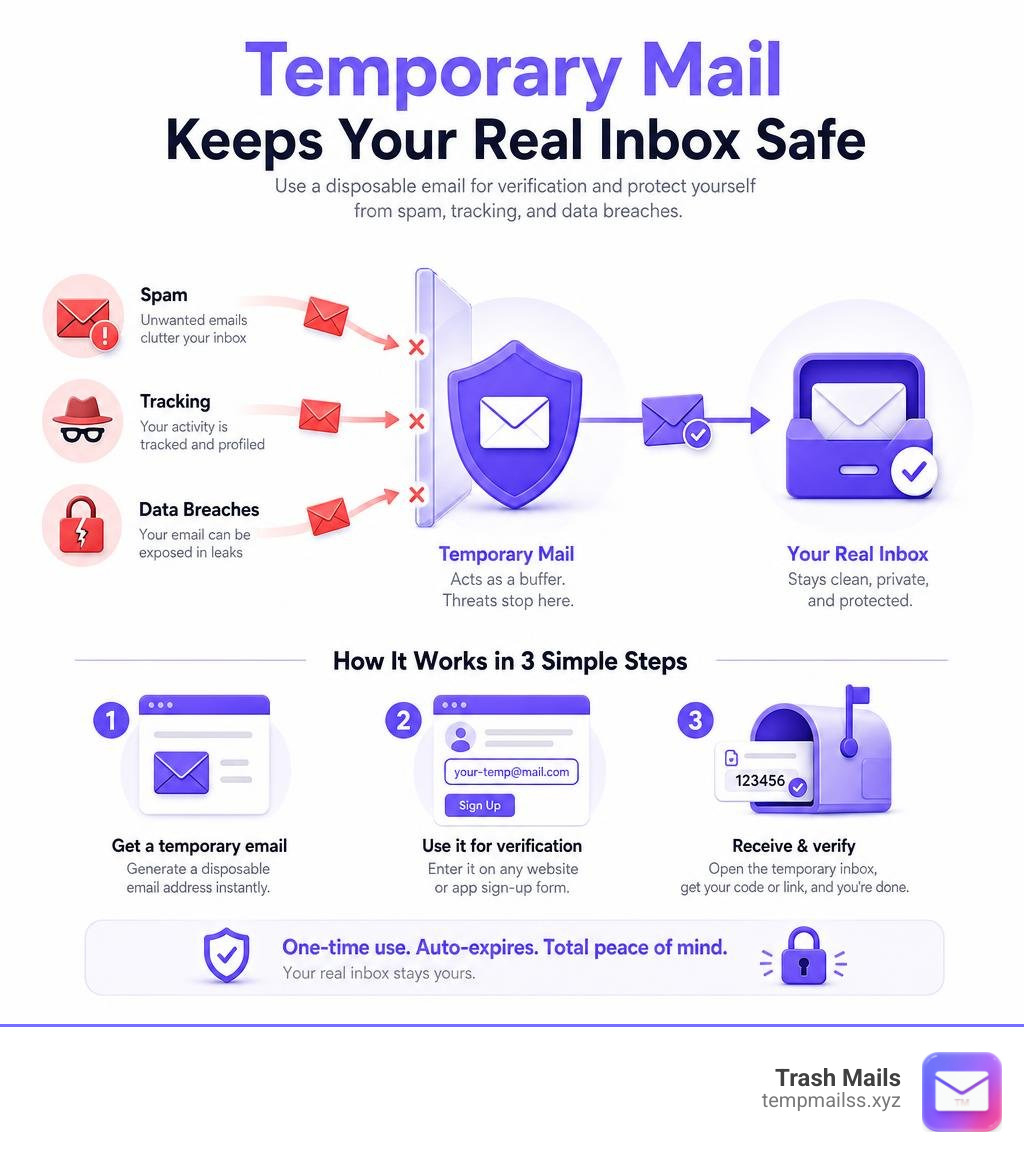
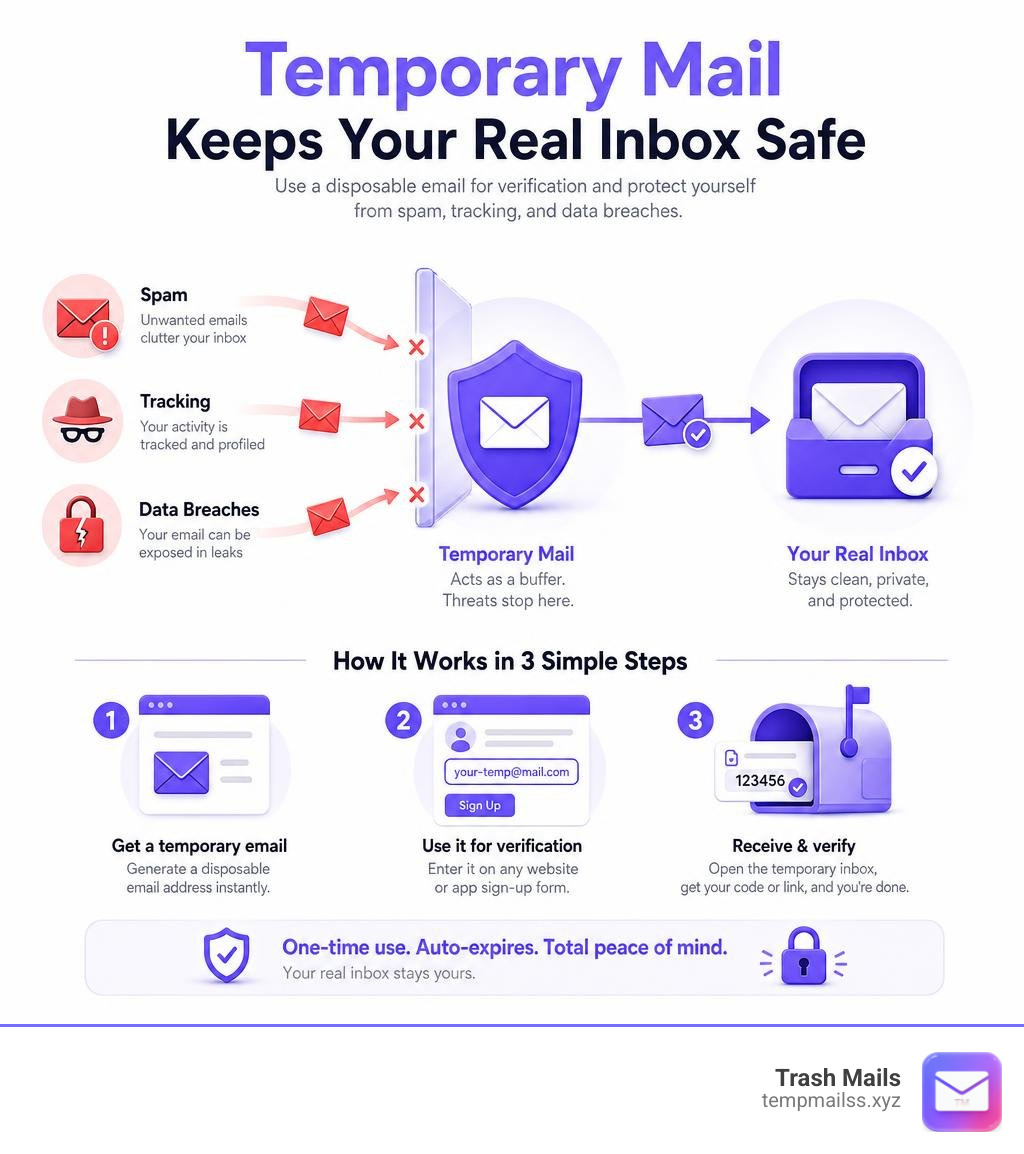
Quick answer — how it works in 3 steps:
- Visit a temporary email service (like Trash Mails) and copy the disposable address generated for you — no sign-up needed.
- Paste that address into any registration or verification form.
- Open the temporary inbox, grab your OTP or confirmation link, and you're done.
The disposable address expires on its own. No spam. No tracking. Your real inbox stays clean.
Think about how many times this week a website asked for your email just to let you read an article, download a file, or claim a free trial. Nearly every app and service on the internet requires an email address before it lets you in.
That email doesn't just sit there. It gets added to marketing lists, sold to data brokers, and sometimes exposed in breaches. One address, shared in the wrong place, can follow you for years.
That's exactly the problem temporary email solves. Services like Trash Mails generate a disposable inbox in under a second — no registration, no personal details, nothing tied back to you. You get the verification code, you move on.
Over 219 million temporary inboxes have been created across major platforms, with more than 1.34 billion emails received through them. Millions of people have already made this a habit. This guide shows you how to do the same.
What is Temporary Mail for Verification and How Does It Work?
At its core, a temporary mail for verification service—often referred to as disposable email, transitory email, throwaway email, or burner mail—is a fully functional email inbox that requires zero setup. Unlike traditional email accounts that require passwords, security questions, and recovery phone numbers, a disposable inbox is generated instantly.
Under the hood, these services utilize advanced self-hosted mail servers configured with real MX (Mail Exchanger) records. This configuration is crucial: it signals to sending servers across the web that our temporary domain is a legitimate, active destination capable of receiving mail. When a website sends a verification email, it travels across the internet and arrives at our mail server in real time.
To ensure maximum security and privacy, modern temporary email platforms employ a receive-only architecture. This design choice is deliberate. By blocking outbound emails, we prevent bad actors from using burner addresses to send spam or launch phishing campaigns. Furthermore, all communications between your browser and the temporary inbox are protected by robust HTTPS encryption, ensuring that no third party can intercept your verification codes or private links while they are in transit.
On a larger scale, the technology is incredibly efficient. Across the privacy ecosystem, temporary email platforms maintain an impressive 99.9% uptime, processing millions of incoming messages daily. In fact, some of the longest-running backends in the industry have processed over 21 billion emails throughout their lifespans, handling upwards of 117,000 messages every single hour.
How to Use Temporary Mail for Verification of Online Accounts
Using temporary mail is incredibly straightforward. Because these services are built for speed and convenience, you can generate a working address in under one second.
Here is how the typical workflow looks when you need to verify an account:
- Step 1: Open your browser and navigate to our free service at Trash Mails. An anonymous, temporary Gmail address is automatically generated for you on the spot.
- Step 2: Copy the address to your clipboard with a single click.
- Step 3: Paste the address into the registration field of the website or app you are trying to access.
- Step 4: Return to the temporary inbox. The page automatically refreshes every few seconds. Within moments, your verification email, confirmation link, or One-Time Passcode (OTP) will appear.
- Step 5: Click the confirmation link or copy the OTP to complete your signup.
This frictionless setup is why temporary email services see over 10 million monthly active users globally. It completely bypasses the tedious process of managing secondary "spam" accounts on traditional platforms.
The Lifespan of a Temporary Mail for Verification Address
One of the most common questions users ask is: How long does a temporary email address last?
The lifespan of a burner inbox depends heavily on the provider and the active session:
- Session-Based Lifespans: Some temporary inboxes are active only as long as you keep your browser tab open. The moment you close the tab or clear your cache, the session expires, and the data is wiped.
- 24-Hour Auto-Deletion: Many reliable services keep your inbox active for a standard 24 hours. This gives you plenty of time to receive delayed verification links or handle follow-up emails, after which the address and all contents are permanently deleted.
- Extended 5-Day Retention: Certain web-based temporary services allow inboxes to persist for up to 5 days, which is ideal for longer testing phases or multi-stage verifications.
- Access Tokens: To prevent losing access prematurely, some advanced platforms provide an access token. By saving this token, you can reopen the exact same inbox across different devices or sessions, provided the retention window hasn't closed.
Regardless of the specific duration, once the expiration limit is reached, secure deletion protocols take over. The emails are not archived or stored; they are permanently erased from volatile memory and self-hosted servers, leaving no digital footprint behind.
Why You Should Use Disposable Email for Online Sign-Ups
Every time you share your personal email address online, you lose a little bit of control over your digital identity. Traditional email addresses have become universal identifiers. Data brokers, advertisers, and tracking networks use your email address to stitch together your browsing habits across different websites, creating a highly detailed profile of your personal interests, purchasing behavior, and location.
By using a temporary mail for verification, you break this cross-site tracking chain. Because each burner address is unique and ephemeral, data brokers cannot link your different accounts together.
Additionally, temporary mail is your ultimate defense against database hacks. When a website suffers a data breach, the first things hackers steal are user email addresses and passwords. If you used a disposable address to register, the leaked email is already deleted and completely useless to attackers.
To see how traditional email compares to temporary options, consider this breakdown:
| Feature | Traditional Email (e.g., Personal Gmail) | Temporary Email (e.g., Trash Mails) |
|---|---|---|
| Setup Time | 3–5 minutes (requires personal data) | Under 1 second (instant generation) |
| Spam Protection | Low (requires manual filtering/blocking) | Absolute (emails self-destruct) |
| Anonymity | None (tied to IP, phone, and name) | High (no registration or PII logged) |
| Tracking Prevention | Poor (used for cross-site profiling) | Excellent (breaks correlation chains) |
| Data Breach Risk | High (permanent exposure of real inbox) | Zero (expired addresses cannot be exploited) |
| Best Used For | Banking, government, critical accounts | Free trials, forums, quick downloads, testing |
Benefits, Risks, and Technical Limitations of Burner Inboxes
While temporary email is an incredible tool for protecting your online privacy, it is important to understand both its strengths and its limitations to use it safely.

The Benefits
The primary benefits of burner inboxes center around convenience, security, and digital cleanliness:
- Bypassing Mandatory Registrations: Easily access gated content, download free eBooks, or join public Wi-Fi networks without sacrificing your inbox to marketing lists.
- Risk-Free Free Trials: Sign up for software, streaming services, or utility tools without worrying about hidden auto-renewal fees or constant promotional reminders.
- Anonymity in Public Spaces: Safely participate in online forums, community wikis, or cryptocurrency discussions without exposing your real identity.
- Dating and Social Profiles: Create secondary profiles on social networks or dating apps to keep your personal life entirely separate.
The Risks and Limitations
Despite these benefits, temporary emails are not a one-size-fits-all solution:
- No Password Recovery: Because these addresses are temporary and self-destruct, you cannot use them for accounts you plan to keep long-term. If you lose your password to a service registered with a temp mail, you will be locked out permanently.
- Domain Blocklists: Some high-trust platforms (like major banking portals or governmental sites) actively block known disposable email domains to prevent abuse and ensure compliance.
- Shared Inboxes on Some Platforms: On certain public services, if another user guesses or accesses the same random address, they might see your incoming mail. This is why using secure, private generators is essential.
Key Features to Look For
When choosing a temporary email provider, look for these essential features to ensure a high-quality experience:
- No Registration Required: You should never have to provide personal information to get a temporary address.
- Custom Domain Support: Access to unique domains helps bypass platform blocklists and ensures higher deliverability by using diverse domain extensions.
- Secure Password Options: For added security during temporary signups, some advanced generators provide secure, temporary credentials alongside the email address.
- Real-Time Delivery: The inbox should update automatically without requiring manual page refreshes.
Developer and QA Use Cases for Automated Testing
Temporary email services are not just for everyday web browsing; they are also critical tools for software developers and Quality Assurance (QA) teams. When building a web application, testing the user registration, password reset, and email verification workflows is a vital part of the development cycle.
Using real email addresses for these tests is highly inefficient. Creating hundreds of dummy Gmail accounts manually is time-consuming, and Google often requires SMS verification for new accounts, making automated bulk creation impossible.
This is where developer-friendly temporary mail APIs come into play. By leveraging REST APIs or GraphQL endpoints, QA teams can programmatically generate unique disposable inboxes, trigger verification emails from their applications, and retrieve the verification tokens or confirmation links via simple API calls.
This allows for seamless end-to-end testing of signup flows, bulk verification harnesses, and webhook integrations. With high-reliability platforms offering 99.9% uptime, developers can run automated test suites continuously without worrying about rate limits or email delivery failures.
Frequently Asked Questions about Temporary Email
Is it legal to use temporary email for verification?
Yes, using a temporary mail for verification is completely legal in every major jurisdiction worldwide. There are no laws prohibiting individuals from utilizing disposable email addresses to protect their online privacy.
However, while legal, using temp mail may violate the Terms of Service (ToS) of certain private websites. High-trust platforms, financial institutions, and government portals often block disposable domains to prevent fraud, comply with Know Your Customer (KYC) regulations, and ensure they have a reliable way to contact their users.
Can temporary email receive OTPs and attachments?
Yes, most high-quality temporary email services are fully optimized to receive One-Time Passcodes (OTPs), verification codes, and standard confirmation links almost instantly.
When it comes to file attachments, capability varies by provider. Some advanced services support receiving common file types (such as PDFs, images, and documents) by temporarily storing them in secure cloud storage, like Amazon S3, before auto-deleting them. However, because temporary mail is receive-only by design, you cannot use these addresses to send outbound emails or attachments, which prevents the service from being abused by spammers.
What happens to my emails after the temporary address expires?
Once a temporary address expires or the session is closed, the inbox and all of its contents undergo secure, permanent deletion. The data is completely erased from our self-hosted mail servers and volatile memory.
Because we prioritize user privacy, we do not archive, back up, or store any message history. This means there is absolutely no way to recover or restore an email once the retention period has ended. It is gone for good, ensuring your private information is never left exposed to future data breaches or unauthorized access.
Conclusion
In an era where online privacy is constantly under threat, taking control of your personal data is more important than ever. Sharing your primary email address with every website you visit is an open invitation for spam, invasive cross-site tracking, and potential identity exposure in data breaches.
Using a temporary mail for verification is one of the simplest, most effective steps you can take to reclaim your digital boundaries. By routing quick signups, free trials, and trivial registrations through disposable inboxes, you keep your real inbox clean, organized, and secure.
Ready to protect your privacy and experience a spam-free internet? Generate your first instant, unlimited temporary email address today at Trash Mails and take back control of your personal inbox.










