
Secure Anonymous Email: Keep Your Inbox Safe from Prying Eyes
Your Inbox Is Being Watched: Here's How to Stop It
Finding the right secure anonymous email method depends on what you need it for. Here's a quick overview of the main options:
| Use Case | Best Option Type | Example Approach |
|---|---|---|
| Everyday private communication | Encrypted email account | A privacy-focused encrypted inbox |
| One-time sign-ups | Disposable/temporary email | Trash Mails |
| Hiding your real address | Email alias/forwarding | A private forwarding alias |
| Maximum anonymity (Tor) | Onion-native email | A Tor-accessible inbox |
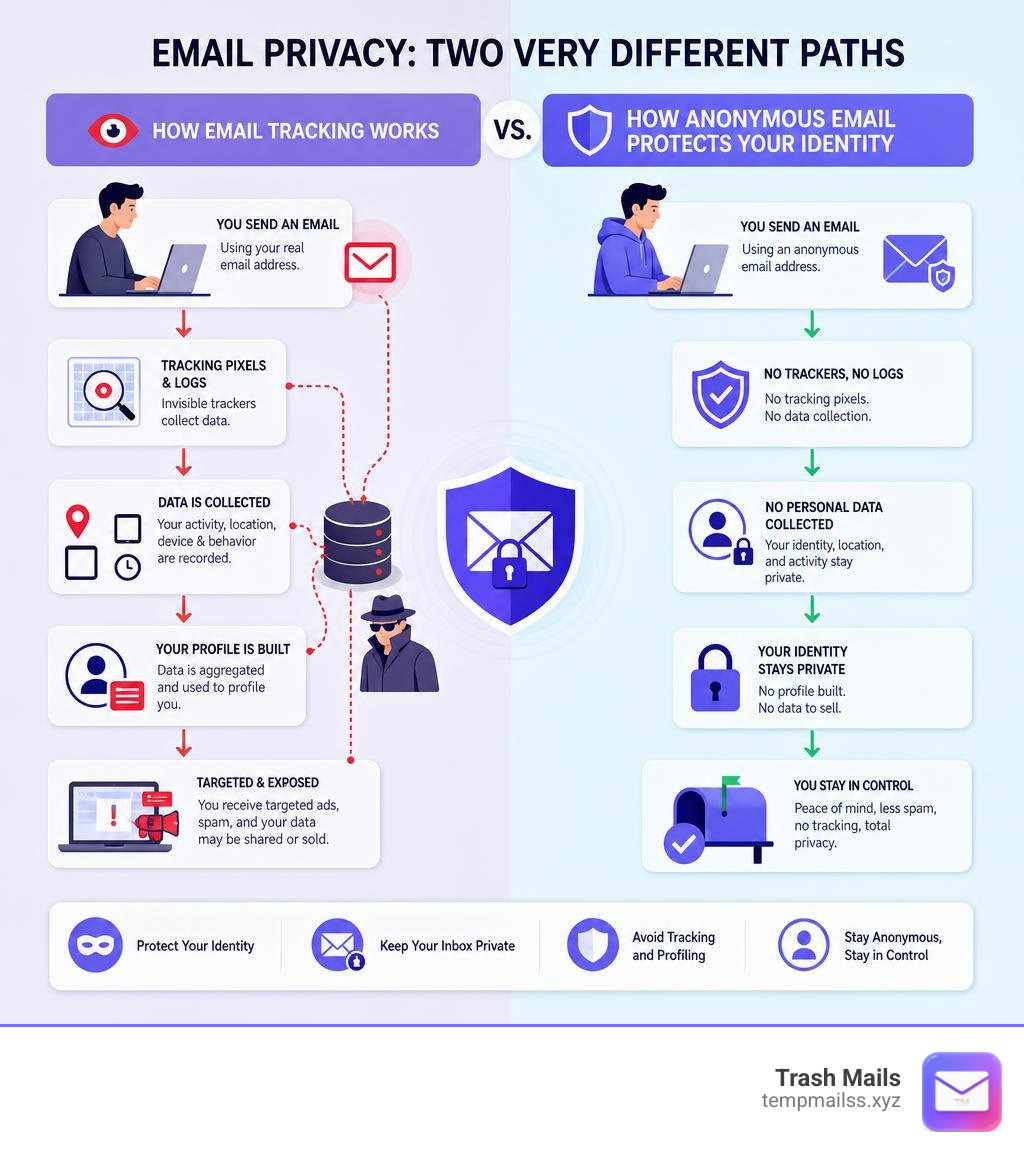
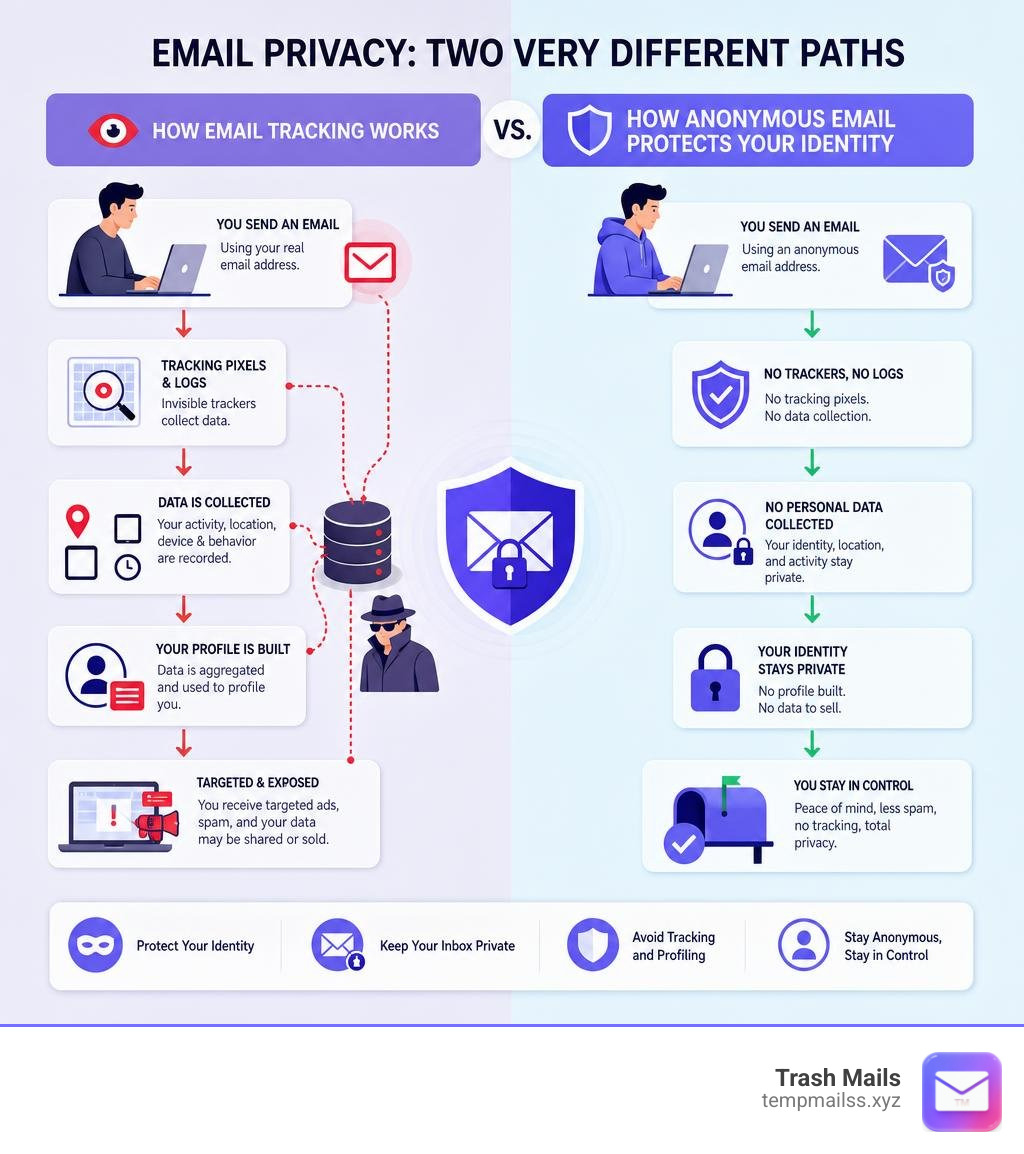
Every time you hand over your real email address, you're handing over a piece of your identity. Mainstream providers like Gmail, Outlook, and Yahoo are built around scanning your messages and building advertising profiles. That's the business model.
The result? Spam floods your inbox. Your data ends up in marketing databases. And when breaches happen, and they do, your real address is exposed.
You don't have to accept that.
Whether you want a throwaway address for a one-time sign-up, or a fully encrypted inbox that even the provider can't read, there are solid options available right now, many of them free.
This guide covers the main approaches, so you can pick what fits your situation.
The Definitive Guide to Secure Anonymous Email Services
When we talk about a secure anonymous email, we are looking at two distinct but deeply connected goals: protecting your identity (anonymity) and protecting your message content (security).
Achieving true online privacy requires a commitment to data minimization. This means that a service should only collect the absolute bare minimum of data required to run your inbox. If a provider does not know your name, your location, your phone number, or your IP address, they cannot hand that information over to third-party advertisers or government agencies—even if they are legally forced to do so.
To make this possible, top-tier privacy services utilize zero-access encryption. When an email arrives at a zero-access inbox, it is immediately encrypted using the user's public key. Once encrypted, only the user's private key (which is derived from their password and kept strictly on their local device) can decrypt it. The service provider has absolutely zero access to the readable message.
For those who require the absolute highest level of anonymity, Tor-accessible email networks represent the gold standard. By accessing your email provider through a native .onion address on the Tor network), your connection is bounced through three independent, encrypted volunteer nodes. This completely hides your physical location and IP address from the email provider itself, ensuring that your digital footprint is virtually non-existent.
Understanding the Core Technology
To navigate secure email, it helps to understand the underlying cryptographic tools that keep the snoops out.
The most famous of these is Pretty Good Privacy (PGP) encryption. PGP uses a system of public and private key pairs. If someone wants to send you a secure message, they encrypt it using your publicly available public key. Once encrypted, the message becomes a scrambled mess of ciphertext. The only way to turn that ciphertext back into readable text is by using your private key, which remains safely stored on your device. Modern secure email providers handle this complex key exchange automatically behind the scenes, so you do not need a computer science degree to send a secure message.

Another crucial pillar is zero-knowledge architecture. In a zero-knowledge system, the servers hosting your email are completely blind to your credentials. Your password is never sent to the host server in plain text; instead, it is used to generate cryptographic keys locally in your browser or app. If a hacker breaches the provider’s data center, they will find nothing but useless, encrypted data.
Finally, we must look at metadata removal. Standard emails carry a hidden trail of digital breadcrumbs. This metadata includes the sender's IP address, the type of device used to write the email, the exact local software version, and precise timestamps. Even if the body of your email is encrypted, an observer can learn a massive amount of information just by analyzing these metadata patterns. Secure anonymous email services actively strip this metadata from the headers of your outgoing messages, ensuring that the recipient only receives the content of the message and nothing more.
Why Mainstream Providers Fail at Privacy
It is no secret that mainstream email giants like Gmail, Outlook, and Yahoo are incredibly convenient. They offer massive storage, slick interfaces, and seamless integrations. But that convenience comes with a massive, invisible price tag.
These free services are built on the foundation of surveillance capitalism. In this business model, your personal communication is treated as raw material. Mainstream providers scan your incoming and outgoing emails, track the newsletters you subscribe to, analyze your purchasing receipts, and monitor your travel confirmations. This information is used to build a highly detailed consumer profile, which is then monetized through targeted advertising.
Furthermore, traditional email providers engage in aggressive IP logging. Every time you log into your account, send a message, or even open an app on your phone, your current IP address is logged and tied permanently to your identity. This creates a continuous, real-time map of your physical movements and digital habits. If a government agency or a law enforcement body requests access to your account, these providers have the technical ability—and the legal obligation—to hand over your entire unencrypted inbox history, complete with IP logs and personal details. If you value your privacy, relying on mainstream tech giants is a losing game.
Key Privacy and Security Features to Look For
If you are ready to make the switch to a secure email provider, you shouldn't just grab the first one you see. You need to evaluate them based on several critical privacy standards:
- Jurisdiction: The physical location of the email servers and the company's legal headquarters matter immensely. You want a provider based in a country with robust, constitutional privacy laws and no mandatory data retention requirements. Switzerland, Germany, and Belize are popular choices because their legal systems protect individual privacy and make it incredibly difficult for foreign intelligence agencies to seize data.
- Open-Source Code: You should never have to take an email provider's security claims on faith. A trustworthy service will make its client-side code open source. This allows independent security researchers and cryptographers to inspect the software, verify that the encryption is implemented correctly, and confirm that there are no hidden backdoors.
- No-Logs Policy: The provider must have a strict, technically enforced policy against logging IP addresses, login times, and email metadata. If they do not log this data, they cannot lose it in a data breach or hand it over to external authorities.
Registration Without Personal Information
The absolute best way to ensure an email account remains anonymous is to sign up without leaving a paper trail. Standard email services will ask you for a first name, last name, date of birth, and almost always a backup email or a phone number for verification. The moment you provide a mobile phone number, your anonymous email account is tied directly to a SIM card registered in your name.
True anonymous email services require nothing but a username and a strong password to get started. No phone numbers, no secondary emails, and no personal details.
But what happens if you forget your password? Because the provider operates on a zero-knowledge model, they cannot send a "password reset link" to your phone. Instead, they will generate a unique seed phrase or recovery key during account setup. You must write this recovery phrase down and store it in a secure, physical location. If you lose your password, this cryptographic phrase is the only way to restore your access.
Anonymous Payment Methods
While many secure email providers offer excellent free plans, you may eventually want to upgrade to a paid tier for extra storage, custom domains, or advanced features. If you pay using a standard visa card or a PayPal account, you instantly link your real-world identity to your private email address.
To maintain your anonymity when upgrading, look for providers that support secure, untraceable payment options:
- Monero (XMR): Unlike Bitcoin, which uses a public, traceable ledger, Monero is a privacy-focused cryptocurrency that hides the sender, recipient, and transaction amount by default. It is the gold standard for anonymous online payments.
- Bitcoin (BTC): While not completely anonymous, Bitcoin can be used privately if you acquire it without identity verification (KYC) and use proper coin-mixing techniques.
- Cash/Gift Cards: Some ultra-secure providers allow you to mail physical cash directly to their offices or pay using anonymous retail gift cards, keeping your financial records completely detached from your digital inbox.
Choosing the Right Anonymous Email Method for Your Needs
Not everyone needs the exact same level of privacy. A whistleblower exposing corporate corruption needs a different toolset than a casual internet user who just wants to download an ebook without getting spammed for the next five years.
To help you choose, let's break down the three primary methods of anonymous emailing: permanent encrypted accounts, email forwarding/aliases, and disposable temporary email tools.
Permanent Encrypted Email Accounts
If you need a secure, private inbox for your daily personal or business communications, a permanent encrypted email account may be the right choice. These services typically provide full-featured email suites, often with calendars, contacts, and custom domain support, all wrapped in encryption-focused security controls.
When comparing encrypted email accounts, look for providers that offer:
- Zero-knowledge or zero-access storage: The provider should not be able to read the contents of your mailbox.
- Strong encryption protocols: Messages should be encrypted at rest, and end-to-end encryption should be available whenever possible.
- Minimal registration requirements: A privacy-focused service should avoid phone verification and unnecessary personal details.
- Secure account recovery: Because the provider may not be able to reset your password normally, recovery keys or seed phrases are often used.
- Transparent security practices: Open-source clients, independent audits, and clear privacy policies are strong trust signals.
The tradeoff is complexity. Permanent encrypted accounts usually require more setup, careful password management, and a better understanding of recovery keys. They are ideal for long-term private communication, but they are more than most people need for simple sign-ups or one-time verification emails.
Email Forwarding and Aliases
If you want to keep using your existing email client but do not want to give your real address to every website you visit, email forwarding and alias tools can be a useful middle ground.
These tools let you generate random, unique email aliases for different websites. When a website sends an email to your alias, the message is forwarded to your real, hidden inbox. If an alias starts receiving spam, you can simply deactivate it. This keeps your primary inbox cleaner and makes it harder for companies to connect your identity across different services and data breaches.
However, forwarding services have limits. The forwarding provider may still process messages in transit, and your main inbox still exists behind the alias. For stronger privacy, sensitive messages should be encrypted before they are forwarded, and aliases should be used with good operational habits.
Disposable and Temporary Email Tools
For quick, one-off interactions, like downloading a PDF, signing up for a free trial, or accessing a public Wi-Fi portal, you do not need a permanent account or an alias. You need a disposable, temporary email address.
This is where we at Trash Mails come in. Our service at Trash Mails provides instant, unlimited, and completely free temporary Gmail addresses with zero registration required.
Unlike permanent providers that require you to manage passwords, recovery keys, and setup processes, we give you a fully functional, anonymous inbox in a single click. You can use it to receive activation links, view attachments, and verify accounts without ever exposing your real identity. Once you are done, the address and its contents are automatically cleaned up, leaving far less data behind than using your personal inbox.
Temporary email is best for low-risk, short-term tasks where you do not want a website to keep your real address forever. It is the ultimate shield to keep your real inbox pristine and spam-free.
Frequently Asked Questions about Anonymous Email
Can a secure anonymous email be traced back to me?
While the best secure email services do not log your IP address or collect personal info, an email can still be traced back to you if you are not careful. If you access your anonymous email account using your home internet connection without any protection, your internet service provider (ISP) logs the connection to that specific email site.
To maximize your anonymity, always use a reputable Virtual Private Network (VPN) or access your email via the Tor Browser. This masks your true IP address. Additionally, make sure to strip metadata from any files or images before uploading them as attachments, and never include personally identifiable information in your messages.
Is it legal to use a secure anonymous email service?
Yes, absolutely. Using secure, anonymous, or encrypted email services is completely legal in the vast majority of countries around the world. Privacy is a fundamental human right, and protecting your personal data from corporate surveillance, hackers, and identity thieves is a perfectly legitimate practice.
However, keep in mind that legality ends where criminal activity begins. Secure email providers maintain strict anti-abuse policies. Using these services to engage in harassment, scams, fraud, or any other illegal activities is strictly prohibited and can result in account suspension or cooperation with local authorities within legal boundaries.
Do anonymous email services require a phone number for signup?
The best anonymous email services do not require a phone number, backup email, or any personal details to sign up. They prioritize data minimization to ensure that your identity is never linked to your account.
If you are signing up for a service that claims to be private but forces you to verify a mobile phone number, you should proceed with caution. Genuine privacy-first platforms, including the permanent providers we highlighted above, will allow you to register using only a username and a password, using decentralized recovery methods like seed phrases to help you regain access if you lose your password.
Conclusion
Taking back control of your digital privacy does not have to be an all-or-nothing battle. You don't have to delete your main accounts overnight; you just need to start using the right tool for the right job.
For your daily, sensitive conversations, consider moving away from Big Tech and setting up a permanent, encrypted inbox with a trusted provider. For everything else—the endless sea of online shopping accounts, newsletter sign-ups, and questionable websites—keep your real identity completely out of the equation.
Whenever a website asks for your email address, don't give them a permanent link to your life. Use a free, instant temporary Gmail address from us to block the trackers, stop the spam, and keep your inbox safe from prying eyes.
Protect your inbox with Trash Mails










