
Don't Get Hooked: How to Report Amazon Spam Emails Safely
Amazon Report Spam: What You Need to Know Right Now
If you've ever received a suspicious message and needed to amazon report spam, here's the fastest way to do it:
How to report Amazon spam — quick answer:
- Got a suspicious email? Forward it as an attachment to reportascam@amazon.com
- No Amazon account? Email reportascam@amazon.com directly with the suspicious message attached
- Suspicious phishing email (AWS-related)? Forward to stop-spoofing@amazon.com
- Got a suspicious phone call or text? Report it to the FTC at reportfraud.ftc.gov
- Received an unsolicited package? Use Amazon's Report Unwanted Package form in your account
- Suspicious product or seller? Log in, go to the product page, and select "This product or content is illegal, unsafe or suspicious"
Amazon impersonation scams are more common than most people realize. In 2024 alone, Amazon took down more than 55,000 phishing websites and 12,000 phone numbers used by scammers pretending to be the company.
These scams arrive by email, phone, text, and even social media. They're designed to look real. And they're getting harder to spot.
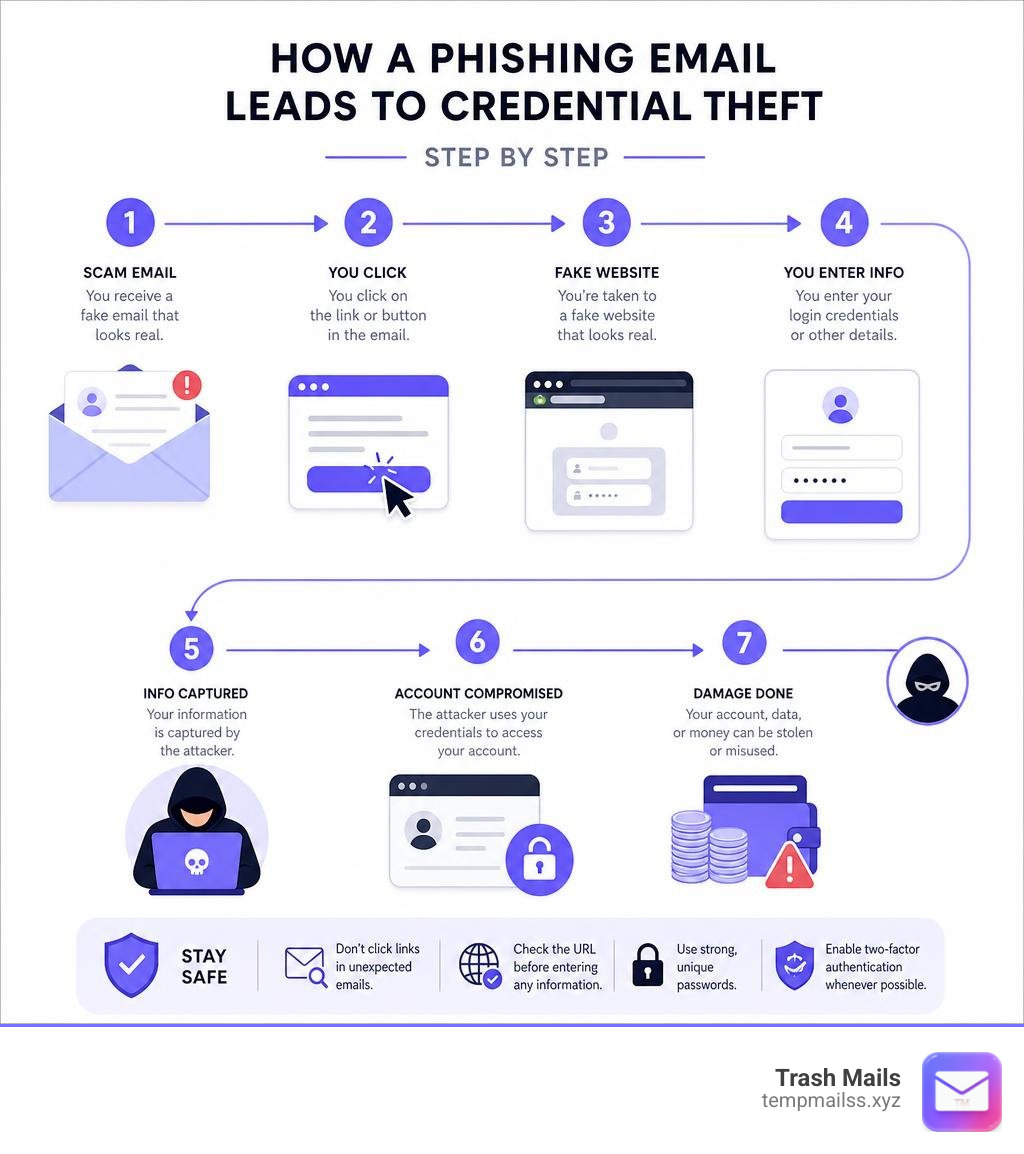
The goal is almost always the same — steal your login credentials, your payment details, or both. In fact, roughly 70% of impersonation scams reported in late 2024 specifically targeted customer account information and payment details.
If you use your real email address to sign up for things online, you're an easy target. One data breach, one dodgy seller, and your inbox starts filling up with convincing fakes.
This guide walks you through exactly how to identify and report Amazon spam — and how to protect yourself from getting hit in the first place.
The Evolution of Amazon Impersonation Scams

Scammers do not sleep. They continuously update their tactics to slip past email filters and catch you off guard. Over the past few years, we have seen a dramatic shift in how bad actors attempt to exploit the trust people place in Amazon.
By analyzing the data, we can see how these tactics pivot depending on the season, the region, and the technology available. To stay safe, it helps to understand exactly what you are up against. You can keep an eye on these shifts by checking the official resource on Tracking the latest scam trends - Trustworthy Shopping at Amazon.
Common Tactics: From Fake Orders to Fraudulent Recalls
The classic "unauthorized purchase" email is still highly effective, but it is no longer the only trick in the book. Scammers have diversified into highly specific niches:
- Fake Order Confirmations: You receive an urgent notification about an expensive item (like a high-end laptop or smartphone) that has supposedly been purchased on your account. The message conveniently provides a phone number to "cancel" the order. Once you call, they attempt to steal your payment details or gain remote access to your computer.
- Fraudulent Product Recalls: A newer and highly dangerous tactic involves fake product safety recalls. Scammers send messages claiming a product you purchased has been recalled due to safety hazards. They direct you to click a link to claim your refund, which actually takes you to a harvesting page for your bank account information.
- Fake Customer Service Accounts: Since late 2024, there has been a 33% increase in customer service impersonation scams on social media. Scammers set up fake profiles with official-looking logos, search for public complaints directed at Amazon's real social handles, and message those users directly to steer them toward external phishing links.
- Employment Scams: Bad actors have started targeting job seekers. They send text messages or emails offering lucrative, work-from-home positions at Amazon, often promising $200 to $500 a day for minimal effort. These fake recruiters eventually ask for upfront "training fees" or equipment deposits, which are paid via cryptocurrency or gift cards.
Key Statistics and Evolving Scam Patterns
Scam trends fluctuate throughout the year, often peaking when consumers are most active online. Interestingly, the data shows that scammers do not always strike hardest during the holidays.
In 2025, impersonation scams reported by Amazon customers actually showed a declining trend as the year progressed. The holiday shopping season in Q4 2025 recorded the lowest scam activity of the year — coming in at 36% below the year's peak in Q1.
However, seasonal spikes still occur. For example, during the month of July, there was a global surge in reports where scammers specifically targeted banking credentials. In August 2024, nearly half of all reports received by Amazon worldwide involved fake order notifications. By September, text message scams warning about fake orders had nearly doubled.
Geographical patterns also vary significantly:
- United States: Email remains the weapon of choice. In 2025, email accounted for 40% to 50% of all reported impersonation scams in the U.S.
- United Kingdom: Phone calls became the leading contact method in 2025, making up 44% of reports and surpassing email at 37%. In fact, phone-based scams in the UK spiked by 71% in just one month between February and March 2025.
- Japan: Email is overwhelmingly dominant, making up roughly 75% of all reported scams in 2025.
Here is a quick look at how these contact methods compare:
| Contact Method | Primary Region Affected (2025) | Key Trend / Peak Period | Primary Scam Objective |
|---|---|---|---|
| United States, Japan | High volume, constant | Phishing for credentials, fake order confirmations | |
| Phone Calls | United Kingdom | Spiked 71% in early 2025 | Direct social engineering, remote access requests |
| SMS / Texts | Global | Doubled in September | Urgent fake order alerts, employment scams |
| Social Media | Global | Up 33% since late 2024 | Fake customer support directing to malicious links |
Red Flags: How to Spot a Fake Amazon Communication

Scammers go to great lengths to make their messages look authentic. They copy Amazon's font, color schemes, and logos. However, because they must send these messages in bulk, they almost always leave behind clues. Knowing how to identify these red flags is your best defense. You can read more about these indicators directly on Amazon's guide to Identifying a scam - Amazon Customer Service.
The most common red flags include:
- False Urgency: The message insists that you must act immediately — often within 24 hours — or your account will be permanently suspended, or you will be charged for a fraudulent purchase.
- Requests for Payment Outside the Platform: Legitimate transactions always happen on the Amazon website or app. If a seller or representative asks you to pay via bank transfer, cryptocurrency, or gift cards, it is always a scam.
- Demands for Remote Access: Real customer service agents will never ask you to install software (like AnyDesk or TeamViewer) to help you resolve an account issue.
- Unusual Sender Addresses: Always look closely at the sender's email address. While the display name might say "Amazon Support," the actual email address might be something like
support@amazon-security-update-382.cominstead of a genuine@amazon.comdomain.
Verifying Messages Through Official Amazon Channels
If you receive a notification and are not sure if it is real, do not click any links or call any numbers provided in the message. Instead, use Amazon's built-in self-service tools to verify the communication:
- Check Your Message Center: Log into your account on the official website or app, navigate to Your Account, and select Message Center. Any genuine email sent to you by Amazon will also exist in this folder. If it is not there, the email you received is a fake.
- Review Your Order History: If you get a text or email warning you about a major purchase, go directly to Your Orders in your account. If the purchase does not appear there, the message is a scam designed to panic you.
- Verify Job Offers: All genuine job opportunities are posted exclusively on the official amazon.jobs portal. Amazon will never recruit via SMS or ask for money during the hiring process.
For more detailed tips on verifying email headers and domains, check out the official helper page on How to identify fake emails - Amazon Customer Service.
How to Use the Official Amazon Report Spam Channels
When you receive a scam message, reporting it helps protect the entire community. Amazon uses these reports to track down malicious domains, block bad phone numbers, and work with law enforcement to take down scam networks.
The primary hub for starting this process is the official Report a scam - Amazon Customer Service page.
Why You Should Use the Amazon Report Spam Tool for Phishing Emails
Reporting phishing emails directly to Amazon's security teams is highly effective. When you report a message, you should ideally forward it as an attachment rather than simply forwarding the text. Forwarding as an attachment preserves the email's hidden metadata (the headers), which tells security analysts exactly which servers sent the message.
If the email appears to target Amazon Web Services (AWS) or cloud-based accounts, you should use the dedicated channel at Suspicious Email Reporting - Amazon Web Services (AWS) to alert their cloud security team.
Step-by-Step: How to Amazon Report Spam Without an Account
You do not even need to be logged into an Amazon account to report phishing. If you do not have an account, or if you cannot log in, follow these steps:
- Open your email client.
- Create a new message addressed to reportascam@amazon.com.
- Drag and drop the suspicious email into your new message to add it as an attachment.
- Send the email.
Note: While Amazon's automated systems will process your report immediately and may send you an automated confirmation, they cannot send personal replies to emails sent to this address.
Handling Unsolicited Packages and Brushing Scams
Have you ever received a package from Amazon that you never ordered, addressed directly to your name? This is likely a brushing scam.
In a brushing scam, dishonest third-party sellers search publicly available address databases to find your name and physical address. They ship cheap items to you so they can write fake, "verified purchase" reviews under your name to boost their search rankings on the platform.
If this happens to you, follow these steps:
- Confirm with your friends and family that the package was not a surprise gift.
- Do not pay for the package. You are legally allowed to keep unsolicited items.
- Go to the official Report Unsolicited Packages or Brushing Scams page.
- Fill out the Report Unwanted Package form, providing the tracking number and a photo of the shipping label if possible.
Amazon takes brushing seriously. When a report is filed, their investigations team can suspend the seller's privileges, withhold their payments, and work directly with law enforcement to stop the abuse.
What to Do If You Have Already Been Scammed
If you realized too late that a message was fake and you already interacted with a scammer, do not panic. Take these immediate steps to secure your assets:
- If you shared your Amazon password: Log in immediately and change your password. If you cannot log in, contact customer support to recover your account. Once recovered, go to your security settings and enable Passkeys or two-factor authentication to prevent unauthorized logins.
- If you shared banking or credit card details: Contact your bank or credit card issuer immediately. Tell them you have been the victim of a phishing scam, freeze your compromised cards, and monitor your statements for unauthorized charges.
- If you gave remote access to your computer: Disconnect your device from the internet immediately. Uninstall any remote access software (like AnyDesk or TeamViewer) and run a full antivirus scan on your system to ensure no malware or keyloggers were left behind.
If you need to report that your account has been compromised, use the quick-access link on Report a scam to select the exact type of information that was shared.
How Amazon Responds to Your Scam Reports
Every report submitted by a customer feeds directly into Amazon’s proactive defense systems. In addition to initiating thousands of website takedowns every month, Amazon uses customer data to build legal cases against scam syndicates. They work alongside local and international law enforcement agencies, providing them with the technical data required to track down and prosecute scammers globally.
Frequently Asked Questions About Amazon Spam
What is a brushing scam and is it dangerous?
A brushing scam is a technique where bad actors send unsolicited packages to your home address to write fake "verified" reviews online. While receiving free items might seem harmless, it means a scammer has access to your name and physical address. It is a clear sign that your personal data has been leaked somewhere online.
Will Amazon ever call me to ask for my password or payment info?
No. Amazon will never call, text, or email you to ask for your password, your full credit card number, or any other sensitive personal details. Any request for this information outside of the official website or app is a scam.
How can I block future spam emails from reaching my inbox?
The best way to block spam is to stop giving away your real email address. When you sign up for newsletters, forums, or online shopping accounts, your real address is often leaked in data breaches.
Using spam filters helps, but a more proactive solution is to use email aliases or temporary email generators. This keeps your personal inbox completely isolated from databases that scammers target.
Conclusion
Staying safe from Amazon impersonation scams requires a mix of awareness and proactive privacy habits. By learning to recognize the signs of false urgency, reporting suspicious messages to the official channels, and knowing how to safely amazon report spam, you can protect your account and your finances.
However, the easiest way to deal with spam is to make sure scammers never get your real email address in the first place.
That is where we can help. At Trash Mails, we provide free, instant, and unlimited temporary Gmail addresses that require absolutely no registration. Whenever you need to sign up for a service, test a website, or make a one-time transaction, you can use our disposable addresses instead of your personal inbox. If a bad actor tries to spam your temporary address, your real inbox remains completely untouched and secure.
Take control of your digital privacy today. Protect your inbox with Trash Mails and keep the scammers out for good.










