
The Ultimate Guide to Free Throwaway Email Addresses
Your Real Inbox Deserves Better Than Spam

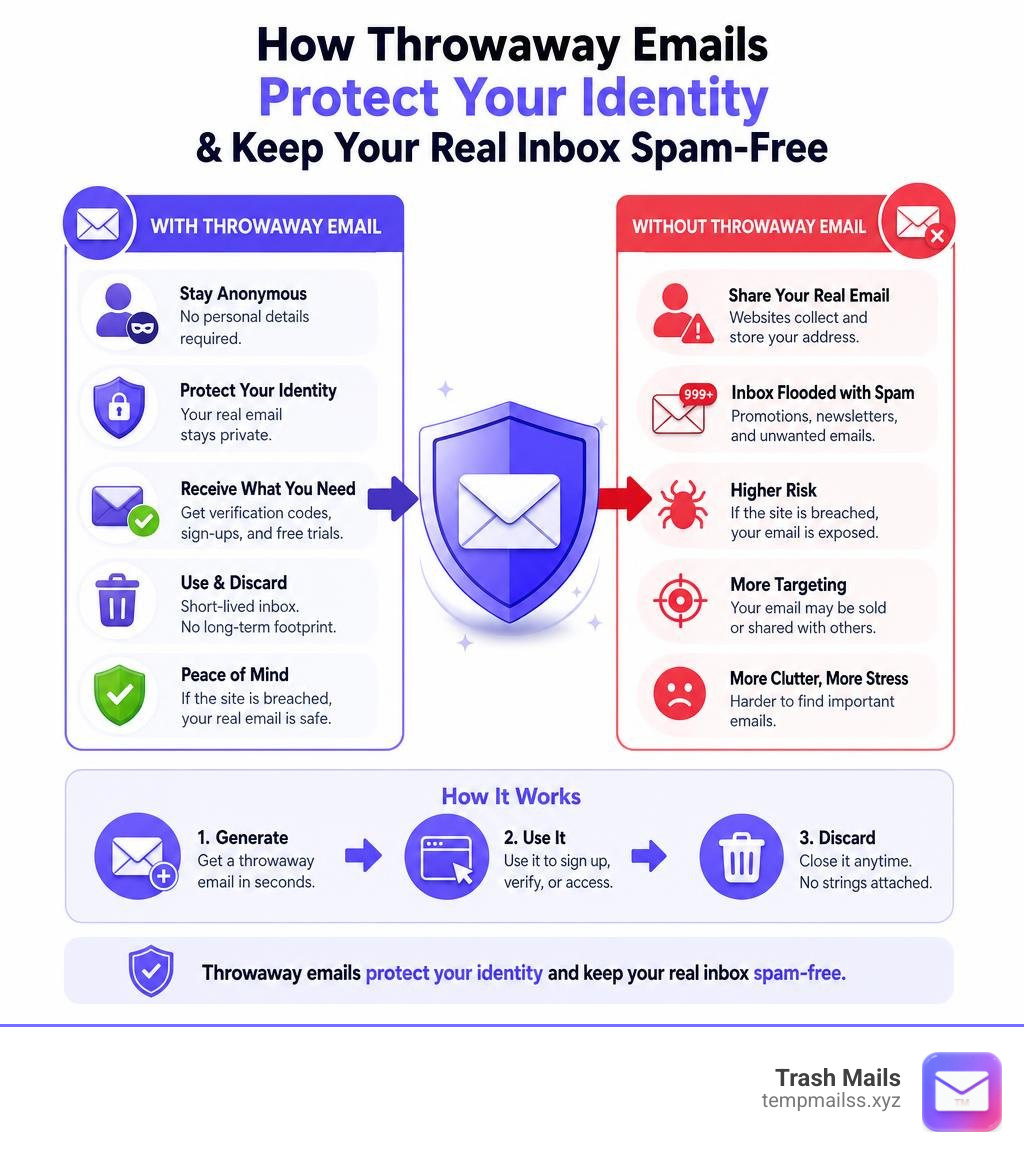
A free throwaway email address is exactly what it sounds like — a temporary, disposable inbox you can use instead of your real email whenever a website asks you to sign up.
Here are the best reasons to use one right now:
- Avoid spam — sign up for anything without cluttering your real inbox
- Stay anonymous — no personal details required, ever
- Get verification codes — works for OTPs, sign-up emails, and free trials
- Protect your data — if the site gets breached, your real address is safe
- No registration needed — generate an address in seconds and use it immediately
Think about how many times a week you're forced to hand over your email just to download a file, read an article, or try a free trial. Nearly 99% of apps and services require an email address to sign up. Most of them turn that address into a marketing list.
That's the problem throwaway emails solve.
Services like these process enormous amounts of mail — one provider alone handles over 117,000 emails every hour. Millions of people already use disposable inboxes every day to keep their real address private.
This guide covers the top free throwaway email services, how they work, and exactly when to use them.
What is a Free Throwaway Email Address?
At its core, a free throwaway email address is a short-lived, fully functional email inbox that requires zero personal information to set up. Unlike your primary email account, which you might keep for decades, a throwaway address is designed to be used for a brief moment and then completely forgotten.
When you use a standard email provider like Gmail or Outlook, you have to jump through multiple hoops. You are asked for your first and last name, your recovery phone number, your birthday, and sometimes even a CAPTCHA verification. This creates a permanent digital footprint linked directly to your real identity. Every time you use that address to sign up for a new service, you are adding another link to your digital chain.
A temporary, disposable inbox breaks this chain entirely. It provides a random email address (such as x9f2k8@yourdomain.com) that can receive messages in real time. You do not need a password, you do not need to fill out a registration form, and you do not need to provide a phone number.
To help visualize how these two systems compare, let us look at the fundamental differences between them:
| Feature | Regular Email Account (Gmail, Outlook) | Free Throwaway Email Address |
|---|---|---|
| Setup Time | 3 to 5 minutes | Instant (under 1 second) |
| Personal Info Required | Name, phone number, birthday | None (100% anonymous) |
| Lifespan | Permanent (years or decades) | Temporary (10 minutes to 48 hours) |
| Primary Use Case | Personal communication, banking, work | Avoiding spam, testing, quick sign-ups |
| Spam Protection | Filters spam (often imperfectly) | Eliminates spam at the source |
| Data Breach Risk | High (exposes your real identity) | Zero (the address vanishes) |
The defining feature of a throwaway address is its cryptographic self-destruction. Once the designated lifespan of the inbox expires, the address and all of its contents are wiped from the mail servers forever. There is no backup, no archive, and no recovery. If a website you signed up for is breached by hackers months later, the email address they steal is completely dead, keeping your personal identity safe and secure.
How Disposable Email Services Work
Behind the scenes, the technology powering a free throwaway email address is both highly efficient and elegant. When you load a temporary email generator, a series of automated background processes work together to give you a functioning inbox in less than a second.
First, the platform's mail servers are configured to accept incoming connections for a wide variety of domain names. Unlike traditional mail servers that route messages to specific, permanent user databases, temporary mail systems use real-time processing. When an email arrives at the server, it is instantly routed to a temporary storage cache (often utilizing fast cloud storage systems) and displayed on your screen via web sockets or real-time page updates.

To prevent these systems from being used for malicious activities, almost all temporary email generators utilize a receive-only design. This means you can receive verification codes, newsletters, and activation links, but you cannot compose and send outbound emails to external addresses. This deliberate anti-abuse measure ensures that the domains remain clean, trusted, and unblocked by major internet service providers.
Another critical component is domain rotation. Because some websites actively try to block temporary email services to force users to hand over their real data, providers constantly rotate and update their active domain lists. By utilizing a diverse pool of fresh domains, these services bypass simple domain filters and ensure your verification emails arrive without a hitch.
Setting Up a Free Throwaway Email Address
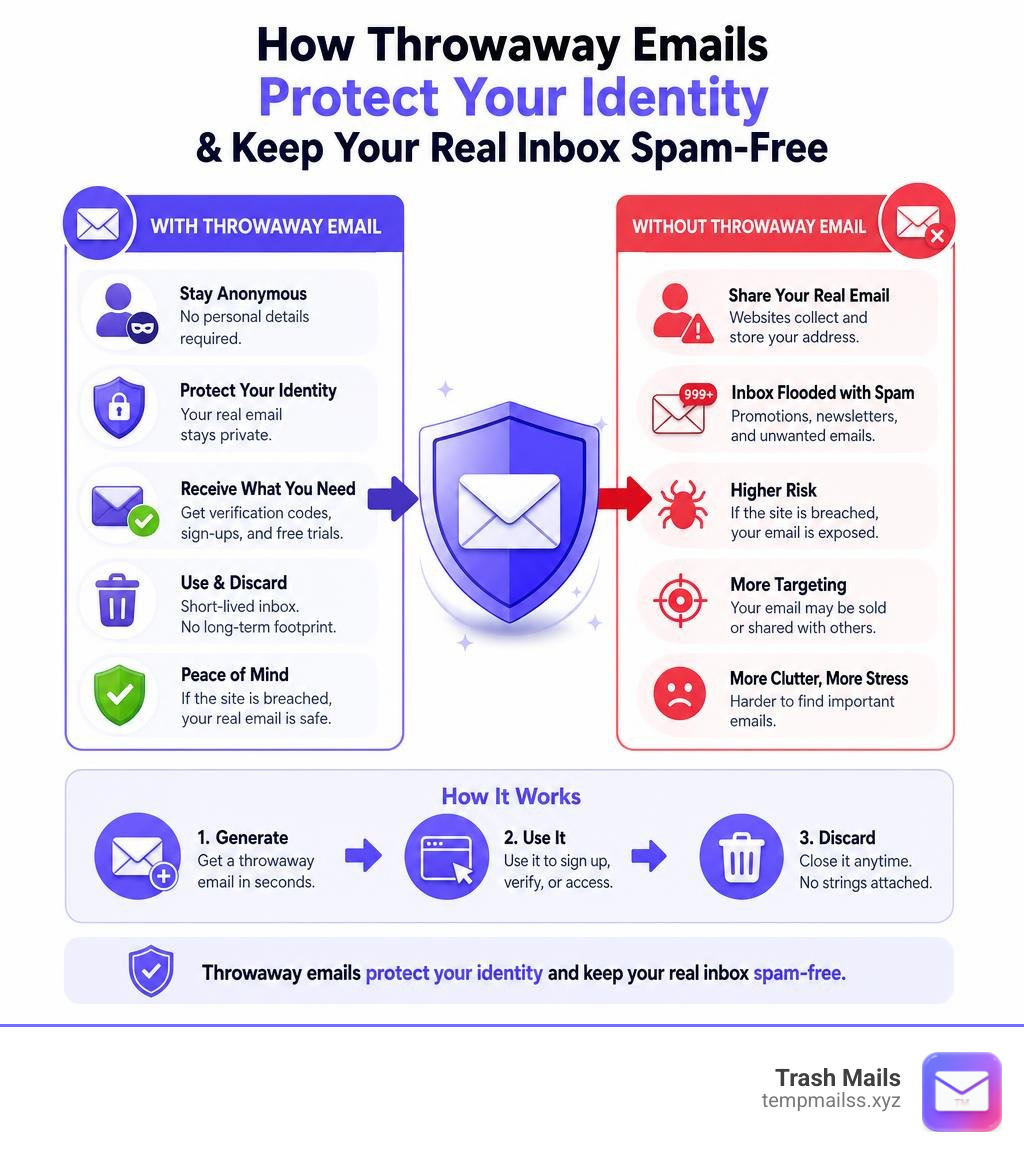
Getting your own temporary inbox is incredibly simple. In fact, it is much easier than ordering a cup of coffee. The process generally involves three basic steps:
- Visit the Generator: Open a trusted temporary mail service in your web browser.
- Copy the Address: The system instantly generates a random address for you on the spot. Simply click the "Copy" button to save it to your clipboard.
- Use and Monitor: Paste the address into the sign-up form of the service you want to use. Keep the generator page open to watch your inbox update in real time as the verification message arrives.
For those who need to access the same inbox over a slightly longer period, some advanced services provide unique "access tokens." An access token is a private cryptographic key that you can save. If you accidentally close your browser window or lose your internet connection, you can enter this token later to reopen the exact same inbox and retrieve any messages that have not yet expired.
Receiving Verification Codes with a Free Throwaway Email Address
One of the most common reasons people search for a temporary inbox is to receive a One-Time Password (OTP) or a verification link. Whether you are trying to bypass a paywall to read a single news article, downloading a free eBook, or trying out a new software-as-a-service (SaaS) tool, these websites almost always demand an email confirmation before giving you access.
Using a temporary address for this is simple:
- Paste the generated address into the website's registration field.
- Submit the form and return to your temporary inbox tab.
- Within 5 to 10 seconds, the verification email will appear in the list.
- Click the email, copy the OTP code or click the activation link, and complete your registration.
Once you have what you came for, you can simply close the tab and walk away. The inbox will expire on its own, and any follow-up marketing emails, weekly newsletters, or promotional offers the company tries to send you will bounce harmlessly into the digital void.
Benefits and Use Cases of Temporary Inboxes
The utility of a free throwaway email address extends far beyond simply avoiding annoying marketing campaigns. In our increasingly connected digital landscape, these tools have become essential instruments for privacy, development, and everyday convenience.

Let us explore some of the most practical, real-world scenarios where a temporary inbox is the perfect solution:
- Bypassing Forced Registrations: Many websites require you to create an account just to view a single page, calculate a shipping rate, or download a PDF. A temporary email lets you get the information you need without committing to a long-term relationship with their marketing department.
- Securing Online Purchases: When making a one-off purchase from an online store you do not plan on visiting again, using a temporary address prevents them from sending you daily "abandoned cart" reminders or discount codes for the next five years.
- Developer and QA Testing: For software developers and quality assurance (QA) engineers, testing registration and authentication flows is a constant necessity. Instead of creating dozens of fake Gmail accounts (which require SMS verification), developers can use automated tools or APIs to generate hundreds of temporary inboxes instantly to run end-to-end testing.
- Managing Dating and Social Profiles: If you are setting up a temporary profile on a dating site or an online forum to browse around, using a throwaway address keeps your personal life completely separate from your professional inbox.
- Avoiding Data Breach Fallout: Cyberattacks are incredibly common, with over 4.1 billion records exposed annually. If you use your real email address on a forum that eventually gets hacked, your address ends up on spam lists sold on the dark web. Using a temporary address ensures that even if the site is compromised, the hackers get nothing of value.
- Accessing Free Trials Safely: Want to try out a streaming service or a design tool for 14 days without worrying about being auto-billed on your real account? A temporary inbox lets you test the waters safely.
For those looking for a reliable, highly rated temporary email tool to handle these scenarios, using a dedicated disposable email service is the perfect solution. These tools provide instant, secure, and private alternatives that keep your real inbox safe from spam and unwanted marketing campaigns.
Frequently Asked Questions about Disposable Emails
We understand that navigating online privacy tools can sometimes raise questions. Below, we have compiled and answered some of the most common queries users have about using temporary and throwaway email addresses.
Are throwaway email addresses safe and private to use?
Yes, provided you use them for the right tasks. Most reputable temporary email services do not collect any personal data, do not require registration, and use secure HTTPS and TLS encryption to protect messages in transit. Because they do not ask for your name or phone number, they are highly private.
However, you must remember that public temporary inboxes are designed for non-sensitive information. Because anyone who knows or guesses the address could potentially view the messages before they expire, you should never use a throwaway email for banking, healthcare, or any account containing personal, financial, or sensitive data.
How long do temporary emails typically last?
The lifespan of a temporary email address depends entirely on the provider you choose.
- 10-Minute Services: These are strictly timed. A countdown clock starts the moment you open the page, and the inbox permanently self-destructs after exactly 10 minutes.
- 24 to 48-Hour Services: These provide more flexibility. The inbox remains active for a day or two, allowing you to receive follow-up emails, reset passwords during a trial period, or complete multi-step registrations.
- Inactivity-Based Services: Some services keep the address alive for as long as you keep the browser tab open or interact with the page, deleting the data only after a set period of complete inactivity.
Can I send emails from a temporary address?
In almost all cases, no. Most temporary email generators are strictly receive-only. This is a deliberate security measure designed to prevent bad actors from using these anonymous platforms to send spam, phishing links, or abusive messages. If you need to have a two-way conversation while keeping your real identity hidden, you should look into dedicated secure email providers rather than basic throwaway generators.
Conclusion
In an era where massive data breaches occur regularly and almost every website demands your personal details, maintaining digital hygiene is more important than ever. A free throwaway email address is your first line of defense against an overflowing inbox, aggressive advertisers, and online tracking.
By integrating temporary emails into your daily browsing habits, you reclaim control over your digital footprint. You decide who gets access to your real inbox and who gets discarded.
When you need a fast, reliable, and completely free temporary Gmail address to keep your digital life clean, we have you covered. Protect your privacy with Trash Mails and experience the peace of mind that comes with a truly spam-free inbox.










