
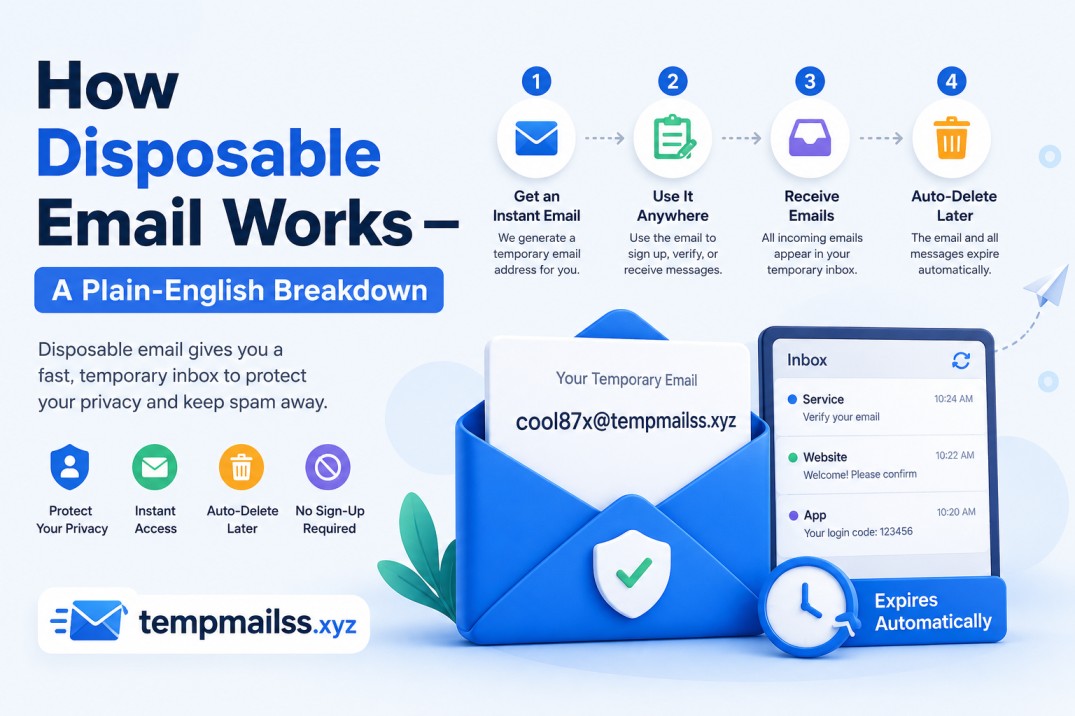
How Disposable Email Works-A Plain-English Breakdown
There's this moment every internet user eventually hits. You find a tool, a guide, a template — something genuinely useful. You click download. And then a form appears asking for your email address before you can have the thing.
You pause. Do you really want to give these people your email? You don't know them. You're not sure if they're going to send you one confirmation email or forty-seven follow-up sequences about "unlocking your full potential."
So you either hand over your real address and regret it later, or you type in something fake and the verification email never arrives, so you never get the download.
That loop frustrated me for years. Then I discovered disposable email, and I genuinely haven't thought about it since. I just use it.
But once I started recommending it to friends, the first question was always the same: "Okay, but how does it actually work?"
Fair question. Let me walk through it the way I wish someone had explained it to me.
The Short Version First
A disposable email address is a real, functioning inbox that was created just for you — instantly, automatically, with no sign-up — and that will delete itself after a short period of time.
It receives emails just like Gmail or Outlook would. The difference is it doesn't require your identity to create, it isn't connected to your permanent digital life, and it disappears on its own when it's no longer needed.
That's the whole idea. Now let's get into how that actually happens under the hood, because it's more interesting than you'd expect.
The Technical Side (Made Actually Readable)
When you open a site like tempmailss.xyz, a few things happen behind the scenes almost simultaneously.
Step 1: An address is generated for you.
The server creates a randomized email address — something like q7rk2@tempmailss.xyz. This isn't pulled from a list. It's typically generated on the fly using a combination of random characters. The domain on the end (the part after the @) is a real domain that the service owns and controls.
Step 2: A temporary inbox is spun up.
The server sets up a mailbox tied to that address. It's a real inbox in every meaningful sense — it can receive emails, attachments, HTML content, plain text. It just has an expiry timer attached to it.
Step 3: The domain catches incoming emails.
This is the part most people don't think about. When you paste that temp address into a signup form and hit submit, the website sends a confirmation email to q7rk2@tempmailss.xyz. That email travels through the internet exactly like any other email — through SMTP servers, through routing, until it lands at the mail server that controls the tempmailss.xyz domain.
Since the service owns and operates that mail server, they catch every incoming email addressed to any variation of their domain — even ones sent to randomly generated addresses that were just created two seconds ago.
Step 4: The email shows up in your browser.
The temp mail website checks the inbox (usually automatically, refreshing every few seconds) and displays any emails that have arrived. You see the sender, the subject, the full email body — everything a normal inbox would show you.
Step 5: Time runs out, everything disappears.
After the set time limit — anywhere from 10 minutes to a few hours depending on the service — the inbox and all its contents are deleted from the server. No archive. No trash folder. Gone.
Why This Is Actually Clever Engineering
What makes disposable email work is a concept called a catch-all mailbox.
Normally, a mail server only accepts incoming emails for addresses that have been specifically registered. Send an email to a nonexistent Gmail address, and you'll get a bounce-back error.
Disposable email services configure their mail server differently. They set it to accept any incoming email addressed to their domain, regardless of whether that specific address was pre-registered. So when the service generates q7rk2@tempmailss.xyz for you, they don't need to register that specific address — their server just catches everything and sorts it by address automatically.
This is what allows temp mail addresses to be created in milliseconds. There's no actual "account creation" happening. The system just needs to remember your address long enough to display incoming mail before the timer runs out.
Walking Through a Real-World Example
Let me use a scenario I've actually gone through.
I wanted to download a free Notion dashboard template from some creator's website. Totally legitimate site, but they wanted my email before the download link appeared. I had no idea if they'd email me once or turn me into a newsletter subscriber indefinitely.
Here's what happened:
- I opened tempmailss.xyz in a second browser tab. An address appeared instantly — I didn't type anything.
- I copied that address and pasted it into the creator's download form.
- I hit submit and switched back to the temp mail tab.
- Within about 15 seconds, a confirmation email appeared with my download link.
- I clicked the link, downloaded the template, and closed the temp mail tab.
Total time spent on the email part: maybe 45 seconds. And my real inbox? Completely untouched.
That's disposable email doing exactly what it's meant to do.
What Happens to the Emails on the Server?
This is something I got curious about and actually looked into.
When an email arrives at the temp mail server, it's stored temporarily — usually in memory or a short-term database table — just long enough to be displayed to whoever is waiting for it. After the inbox expires, it's purged.
Reputable services don't index or archive these emails for any purpose. The whole value of the product is that there's nothing to trace back to you. A service that was quietly saving your emails would kind of defeat the point, and it would be a serious trust issue if discovered.
That said — and this is worth knowing — the emails do pass through a server that isn't yours. This is why temp mail is great for low-stakes use (confirmations, download links, free trial signups) but not appropriate for anything that contains genuinely sensitive personal data. It's convenience, not a vault.
The Difference Between Temp Mail and Email Aliases
I want to clear up something that confused me early on.
Services like SimpleLogin, Apple's "Hide My Email," or Fastmail's masking feature also give you alternative email addresses. But those are aliases — they forward emails to your real inbox permanently, and they're tied to your actual account.
Disposable email is different in a few key ways:
- No account required. You don't sign up for anything.
- No forwarding. Emails live on the temp server, not your real inbox.
- Truly temporary. The address and its history vanish.
- No ongoing relationship. You don't manage it, pay for it, or think about it after you're done.
Aliases are great for long-term privacy management. Disposable email is for situations where you just need an address right now and don't want anything lingering.
What Temp Mail Can and Can't Receive
Most disposable inboxes handle standard email just fine. What you can expect to receive without any issues:
- Plain text emails
- HTML-formatted emails (the pretty kind with images and buttons)
- Confirmation links
- OTP (one-time password) codes
- Download links
- Welcome emails
What's trickier:
- Large attachments — some temp mail services limit attachment size or skip rendering them.
- Emails from services that block temp mail domains — more on this below.
- Multi-step email flows — if the second email arrives after your inbox expires, you're out of luck.
The Cat-and-Mouse Problem
Here's something honest I should mention: some websites and apps actively try to block disposable email addresses.
They maintain lists of known temp mail domains and reject them during signup. If you try to use a temp address on certain platforms — some gaming sites, financial apps, or services that are strict about identity — you'll see an error like "Please use a valid email address" even though your temp address is technically valid.
Why do they do this? Usually to prevent abuse of free trials, or because their business model depends on being able to reach users long-term.
This is a legitimate tension. Services like tempmailss.xyz regularly update their domains to stay functional, but it's worth knowing that not every site will accept a temp address. For those, you'll need your real email — which is a reasonable ask if you're signing up for something you genuinely want long-term access to.
Mistakes That Will Catch You Off Guard
Using temp mail for accounts you'll actually need later.
I did this with a SaaS tool once. Signed up with a temp address because I wasn't sure I'd stick with it. Three weeks later I was very much sticking with it and needed to update my payment info. Password reset? Sent to the temp address. Which was gone. I had to contact their support team and it took days to sort out. Lesson fully learned.
Waiting too long to grab your verification code.
Temp mail inboxes have a clock ticking. If the site you're signing up on sends a verification code that expires in 5 minutes, and your temp inbox also has 5 minutes left — you might hit a race condition. Use temp mail when you can act on it immediately.
Assuming temp mail = anonymous browsing.
Your IP address is still visible to the sites you visit. Temp mail hides your email identity, not your location or browsing behavior. If full anonymity is what you need, that's a different toolset entirely.
Sharing the temp address with someone else.
Since temp mail inboxes aren't password-protected in the traditional sense, anyone who knows your temp address could check the same inbox. It's not a private channel for communication — it's a receiving inbox for one-time use.
A Few Services Worth Knowing About
Beyond tempmailss.xyz, there are others in this space worth being aware of, each with slightly different features:
- Guerrilla Mail — one of the oldest in the space, supports sending emails too
- Mailinator — popular with developers for testing email flows (public inboxes, anyone can check them)
- 10 Minute Mail — extremely simple, auto-deletes after 10 minutes exactly
- Temp-Mail.org — browser extension available, slightly longer inbox life
Each has tradeoffs. Some are blocked more widely than others. Some offer longer inbox windows. tempmailss.xyz keeps things clean and straightforward — generate an address, receive emails, done.
The Part Nobody Talks About
There's something low-key empowering about understanding how disposable email works.
Most of us were never taught that handing over your email to every website is optional. We grew up thinking that if a site asks for your email, you give it — because that's just how the internet works.
It doesn't have to be. Your real email address is yours. It connects to your identity, your accounts, your communication history. You get to decide who has it.
Disposable email isn't a hack or a workaround. It's just using the way email infrastructure works — domains, mail servers, catch-all inboxes — to your own advantage. The technology was always there. Someone just made it accessible in a browser tab.
Once you understand how it works, you start to see the situations where it fits naturally. Not everywhere. Not for everything. But for the daily friction of the modern web — the forms, the gates, the "just give us your email" walls — it's become one of those tools I genuinely can't imagine not having.
Got questions about when to use temp mail or how to get the most out of it? Leave a comment — I check them regularly.










