

Avoid the Junk Folder: 5 Free Spam Checker Tools Compared
Why Your Emails Keep Landing in the Junk Folder
A free spam checker is a tool that scans your email content before you send it, flagging words, formatting, and technical issues that could trigger spam filters.
Here are the top 5 free spam checker tools in 2026:
| Tool | Best For | Privacy | Signup Required |
|---|---|---|---|
| Mailmeteor | Newsletters & cold email | Browser-based, no server | No |
| Unspam | Full deliverability testing | Account required | Yes (free tier) |
| Lessie AI | Cold email optimization | Browser-based, no server | No |
| AI Parabellum | Security & phishing detection | Processed, not stored | No |
| Nurturely+ | Scam & spam detection | Deleted after scan | No |
You wrote a great subject line. You checked it twice. Then you hit send — and it went straight to junk.
This happens more than you'd think. According to research from email deliverability tools, spam complaints are the number one factor hurting inbox placement. And content is only one piece of the puzzle.
The problem is that most people don't test their emails before sending. Spam filters at Gmail, Outlook, and Yahoo analyze dozens of signals — from the words you use to whether your domain has proper authentication set up. One misconfigured DNS record or a phrase like "limited time offer" can push your message into the void.
That's where spam checkers come in. The good news: you don't need to pay for one to get useful results.
This guide compares five free tools so you can pick the right one for your situation — whether you're sending cold outreach, newsletters, or just trying to stop your transactional emails from disappearing.
What is a Free Spam Checker and How Does It Work?
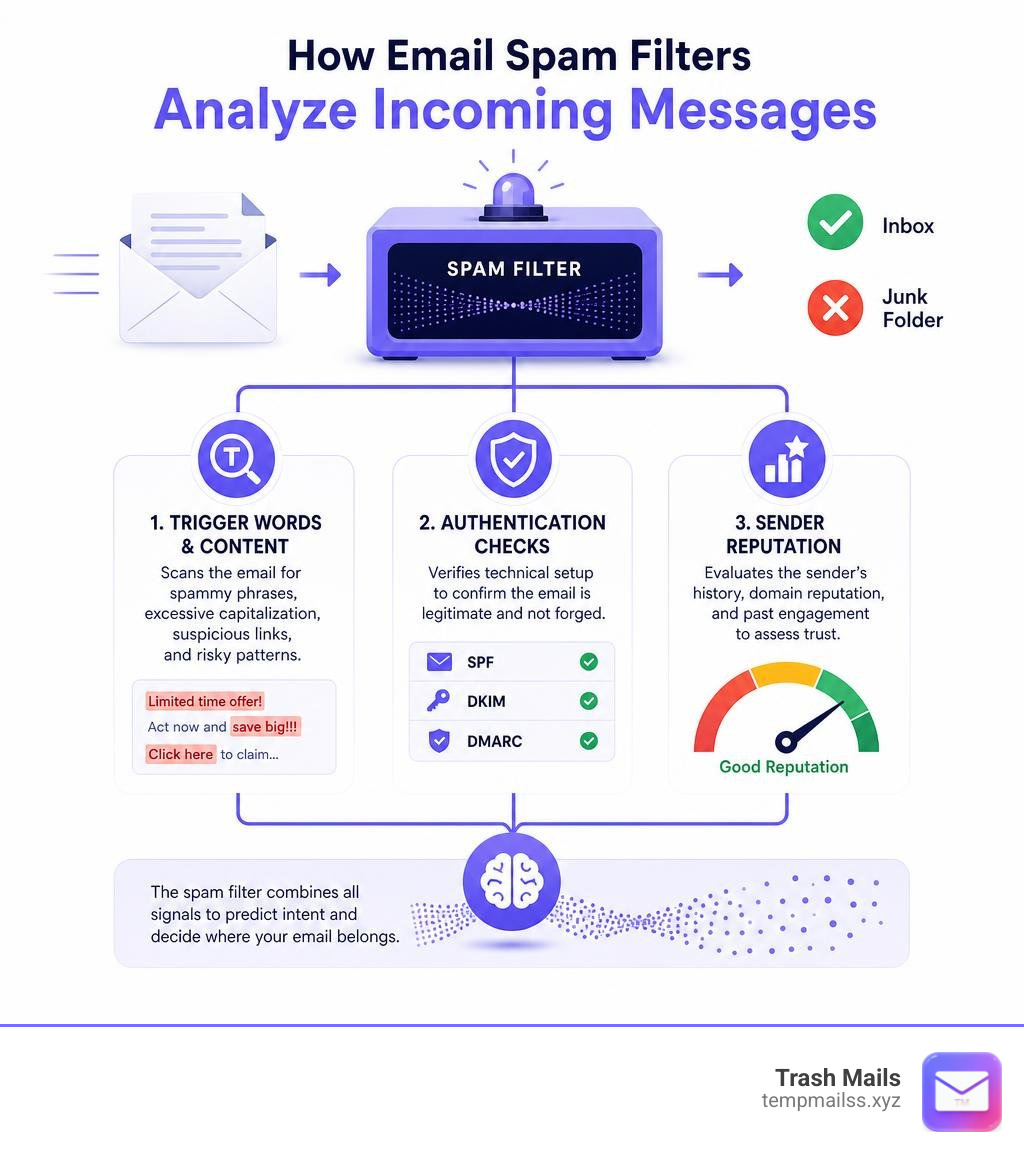
At its core, a free spam checker is a diagnostic tool designed to evaluate the "spamminess" of your email campaigns before they reach your subscribers. It acts as an early warning system, simulating how modern Inbox Service Providers (ISPs) like Google and Microsoft will judge your message.
When you run a test, these tools typically analyze three core layers:
- Content and Vocabulary: The tool scans your copy against a dictionary of known spam trigger words. It looks for aggressive sales language, excessive capitalization, and over-the-top punctuation (like three exclamation points in a row).
- Technical Setup: More advanced checkers test your email deliverability by verifying your domain’s DNS records. They check if you have authenticated your domain using industry-standard protocols.
- Sender Reputation: They check whether your sending IP address or domain has been flagged on major global blacklists.
By combining these checks, the tool calculates a spam score. A high score means your email is clean and ready to go; a low score indicates formatting issues, technical errors, or risky copy that will trigger Gmail filters and Outlook filters.
Furthermore, Yahoo bulk-sender rules and Gmail's strict algorithms demand that high-volume senders maintain flawless technical setups. If you do not proactively check these elements, your emails will automatically be routed to the junk folder. To dive deeper into the mechanics of how these systems evaluate incoming traffic, you can Learn more about spam detection.
5 Best Free Spam Checker Tools Compared
To help you find the perfect fit for your workflow, we have tested and compared the top five free tools available today. Each of these tools takes a slightly different approach to analyzing email health, ranging from simple copy editors to deep technical diagnostic suites.
Mailmeteor Free Spam Checker
The Mailmeteor Spam Checker is a streamlined, incredibly fast, and privacy-focused tool built directly into your web browser.
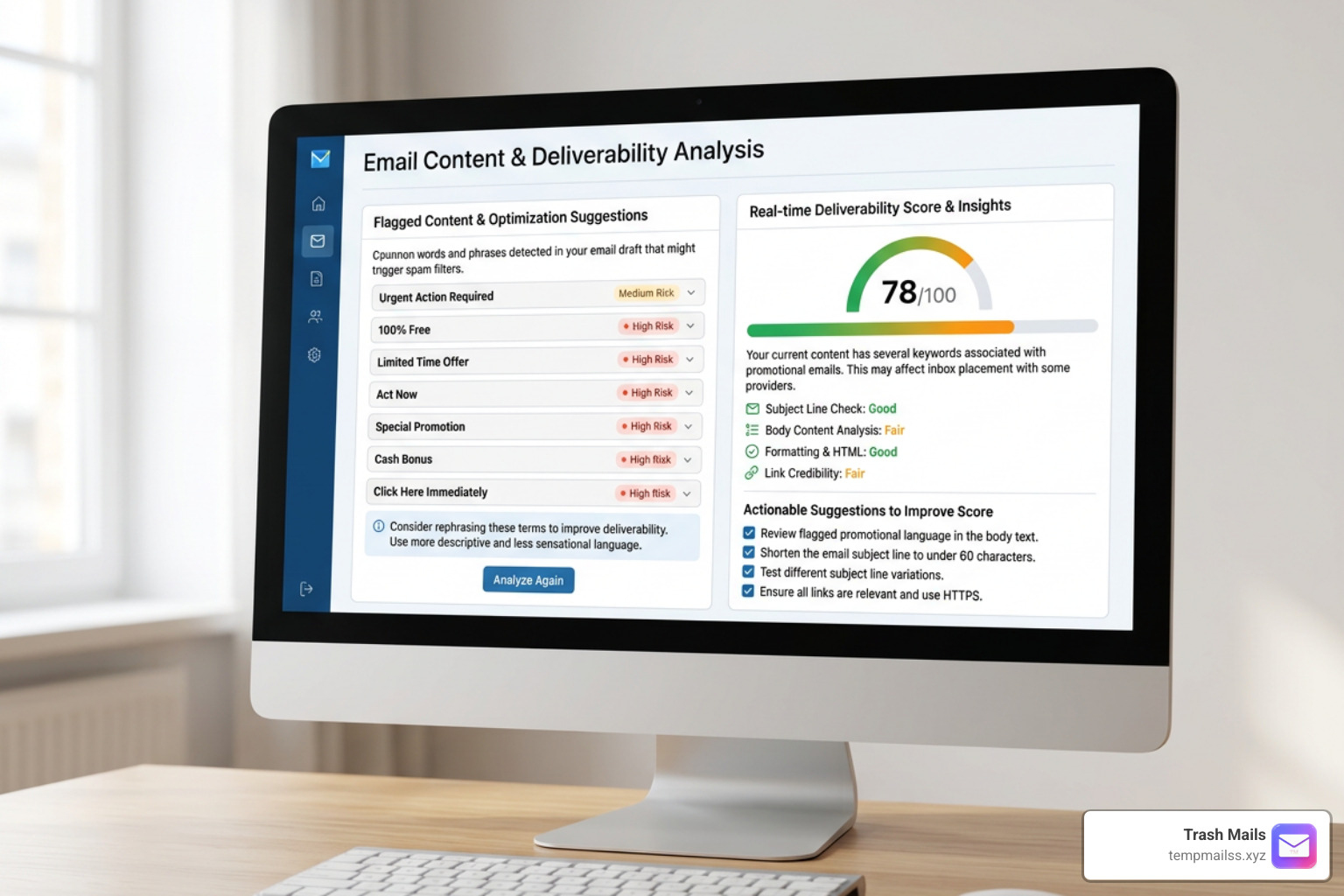
Instead of requiring you to send a test email to a dummy address, Mailmeteor allows you to simply copy and paste your subject line and email body directly into an interactive text box. It instantly highlights risky terms and groups them into five distinct categories: urgency, shady, overpromise, money, and unnatural language.
- How it works: The tool runs entirely client-side. This means your text is analyzed locally using JavaScript inside your browser; your email content is never sent to external servers, making it 100% private.
- Key Features: Real-time visual highlighting, a clean interactive editor, and actionable rephrasing suggestions.
- June 2026 Updates: The deliverability team at Mailmeteor regularly updates its database to reflect the newest filtering trends utilized by Gmail and Yahoo.
If you are looking for a quick, zero-friction way to clean up your marketing copy before hitting send, you can Test your emails with Mailmeteor.
Unspam Email Deliverability Test
If you need a comprehensive, enterprise-grade diagnostic report without paying a dime, Unspam is one of the most robust options on the market.
Unlike simple copy-paste checkers, Unspam provides you with a unique, temporary testing email address. You send your email campaign directly to this address from your newsletter platform or email client, and Unspam generates a comprehensive deliverability report within seconds.
- Technical Auditing: It checks your domain’s SPF check, DKIM check, and DMARC check to ensure your technical authentication is fully aligned.
- Blacklist Monitoring: Unspam automatically cross-references your sending IP and domain against major industry blacklists like Spamhaus, SpamCop, and Barracuda.
- Inbox Placement: It provides a simulated placement test across major providers, showing you whether your email would land in the Primary inbox, Promotions tab, or Spam folder.
- Accessibility and Design: It even analyzes your email's visual layout, testing for dark mode compatibility, color contrast, broken links, and providing an AI-powered eye-tracking heatmap to show where readers will focus.
Unspam provides a baseline 90/100 spam score with high deliverability insights, helping users achieve placement rates well above the industry average. To get a complete, multi-dimensional view of your email health, you can Analyze your deliverability with Unspam.
Lessie AI Free Spam Checker
Lessie AI is built specifically for cold email optimization, sales outreach, and business-to-business (B2B) communications. Because cold outreach starts with zero sender-recipient engagement history, cold emails are held to a much higher standard by spam filters. Lessie AI helps you optimize your copy to meet these strict requirements.
- Formatting Red Flags: The tool analyzes structural elements that spam filters hate, such as high link density (having too many links relative to your word count) and excessive use of bolding or all-caps text.
- Subject Line Length: It checks your subject line to ensure it falls within the ideal sweet spot of 30 to 50 characters. Subject lines that are too short or overly long are immediately flagged.
- Scoring System: Lessie AI starts your email draft with a perfect score of 100 points. It then deducts points based on the severity of issues found—minor formatting issues might cost you 5 points, while heavy spam triggers can deduct up to 20 points.
For B2B sales reps and outreach teams, keeping your score above 85 is critical to landing in the primary inbox. You can Score your cold emails with Lessie AI.
AI Parabellum Spam Detector
AI Parabellum offers a cutting-edge, AI-powered spam detector designed to look beyond basic keyword lists and analyze the actual context, intent, and structure of your message.
- Advanced Contextual Analysis: Traditional checkers only look for specific words like "free" or "money." AI Parabellum’s AI model recognizes conversational patterns, deceptive phrasing, and psychological manipulation tactics commonly used in phishing and malware campaigns.
- Component Analysis: The tool breaks down your email into individual sections (From address, Subject Line, and Email Body) to run a multi-layered security analysis.
- Security Threat Detection: It is highly effective at identifying sophisticated threats, including fake invoices, urgent executive impersonation, and malicious link structures.
This tool is incredibly valuable for both businesses wanting to ensure their transactional emails don't look like phishing attempts, and individuals looking to verify suspicious incoming messages. To experience next-generation pattern matching, you can Detect spam with AI Parabellum.
Nurturely+ Spam & Scam Detector
Nurturely+ provides a specialized real-time analysis tool focused on protecting users from scams, fraudulent emails, and malicious web links.
- Multi-Format Uploads: Instead of just analyzing plain text, Nurturely+ allows you to upload screenshots, PDFs, and
.emlfiles. - Scam Pattern Matching: Its AI model is trained on millions of historical scam messages, including delivery tracking scams, fake tech support pop-ups, and complex financial schemes.
- Malicious Databases: The tool cross-references any links, phone numbers, or sender domains found in your message against real-time global threat intelligence databases.
- Platform-Specific Reporting: If a message is flagged as high risk, Nurturely+ provides direct, customized reporting links to help you report the spammer to the proper platforms (such as Google, Microsoft, or social networks).
It is an excellent, community-focused tool for double-checking suspicious messages before you click a link or reply. You can Verify suspicious messages with Nurturely+.
Key Factors That Trigger Spam Filters Beyond Content
Many marketers believe that if they simply delete words like "guaranteed" or "no risk" from their copy, their deliverability issues will magically disappear. Unfortunately, content is only one of many signals that modern spam filters evaluate.

If your technical setup or sender reputation is compromised, even an email containing nothing but natural, friendly language will be blocked.
1. Technical Authentication Protocols (SPF, DKIM, DMARC)
Think of email authentication as a digital passport for your domain. If you don't have it, ISPs will assume you are an impostor.
- SPF (Sender Policy Framework): Specifies which IP addresses are authorized to send emails on behalf of your domain.
- DKIM (DomainKeys Identified Mail): Adds a cryptographic signature to your emails, proving the message wasn't altered in transit.
- DMARC (Domain-based Message Authentication, Reporting, and Conformance): Tells receiving servers what to do if an email fails SPF or DKIM checks (e.g., reject it or send it to spam).
Since February 2024, Google and Yahoo have mandated that any bulk sender delivering over 5,000 emails per day must have all three protocols correctly configured.
2. Sender and IP Reputation
Your sender reputation is a credit score assigned to your domain and sending IP address by ISPs. If you send emails to invalid addresses, buy email lists, or experience sudden spikes in sending volume, your reputation score will plummet. Once your reputation is damaged, your emails will be automatically routed to the spam folder, regardless of your content.
3. Spam Complaint Rates
When a recipient clicks the "Report Spam" button in their inbox, it sends a powerful signal to the ISP. Under current bulk-sender rules, you must keep your spam complaint rate below 0.3%. Exceeding this threshold, even temporarily, can severely damage your inbox placement.
Free vs. Paid Deliverability Tools: When to Upgrade
Free spam checkers are incredibly useful for pre-flight content checks, basic technical audits, and quick copy adjustments. However, they do have limitations.
| Feature | Free Spam Checkers | Paid Deliverability Tools |
|---|---|---|
| Primary Focus | Content analysis & basic DNS check | Deep infrastructure & placement monitoring |
| Testing Method | Browser paste or single test email | Seed lists across dozens of global ISPs |
| Automation | Manual, run before each send | Automated monitoring & autopilot scheduling |
| IP/Domain Tracking | One-time check against top blacklists | Continuous, real-time blacklist alerts |
| Corporate Stacks | Rarely tested | Includes Microsoft 365, Google Workspace, & secure corporate gateways |
If you are a small business owner, a freelancer, or an outreach representative sending personal campaigns, free spam checkers are more than enough to keep your deliverability healthy.
However, if your business relies on automated drip sequences, transactional emails (like password resets), or high-volume newsletters where a 5% drop in open rates translates to thousands of dollars in lost revenue, upgrading to a paid deliverability tool with automated monitoring is a smart investment.
How to Improve Your Email Spam Score and Deliverability
If your spam checker results came back with a less-than-stellar score, don't panic. Improving your deliverability is a step-by-step process of cleaning up your copy and technical infrastructure.
- Maintain Strict List Hygiene: Never send emails to purchased lists. Regularly clean your subscriber list to remove inactive, unengaged, or bounced email addresses. High bounce rates are a primary trigger for spam filters.
- Balance Your Image-to-Text Ratio: Spam filters cannot read images, so spammers often hide promotional copy inside large graphics. To avoid looking suspicious, ensure your emails contain at least 200 words of real copy, and never send image-only emails.
- Use Natural, Conversational Language: Instead of using high-pressure sales pitches like "ACT NOW!!!", write like a real human. Use natural synonyms and focus on personalization to make your emails engaging.
- Include a Clear Unsubscribe Link: Make it easy for people to opt out of your emails. A visible, one-click unsubscribe link prevents frustrated readers from clicking the "Report Spam" button, protecting your sender reputation.
- Verify Your Links: Ensure all links in your email lead to secure (HTTPS) domains and are fully functional. Avoid using generic URL shorteners, as spammers frequently use them to hide malicious destinations.
Frequently Asked Questions About Email Spam Testing
How accurate are free spam checkers compared to paid tools?
Free spam checkers are highly accurate when it comes to analyzing content heuristics, identifying spam trigger words, and checking basic domain authentication. However, they cannot perfectly predict real-world inbox placement because they do not use live seed lists across hundreds of different local ISPs, nor can they account for the unique engagement history between you and your specific recipients.
Do free spam checkers store or share my email content?
It depends on the tool. Browser-based tools like Mailmeteor and Lessie AI process your text locally within your browser, meaning your content never leaves your device and is entirely private. Other tools that require you to send an email to a test address will temporarily process your email on their servers to generate your report, but reputable providers delete this data shortly after the test is complete.
Why do my emails go to spam even if I don't use trigger words?
Content is only one of many signals. If your emails are still landing in spam, it is likely due to a poor domain or IP reputation, missing or misconfigured authentication records (SPF, DKIM, DMARC), high spam complaint rates from past campaigns, or low recipient engagement (such as users deleting your emails without opening them).
Conclusion
Landing in the junk folder is a frustrating experience, but it is entirely preventable. By regularly using a free spam checker, you can catch formatting errors, eliminate risky sales language, and verify your technical setup before your subscribers ever see your messages.
However, the absolute best way to stop spam is to prevent spammers from getting your real email address in the first place.
At Trash Mails, we provide instant, unlimited, and completely free temporary Gmail addresses with no registration required. Whether you are signing up for a free trial, testing an app, or downloading a resource, our temporary mail service keeps your personal inbox clean, secure, and completely free of unwanted junk. Protect your inbox with Trash Mails today!










