


10 Best Temporary Gmail Alternatives
Why Temporary Gmail Addresses Are Replacing Disposable Email for Good
A temporary Gmail address is a short-lived, disposable inbox using the trusted @gmail.com domain — and it solves a problem that regular temp mail services can't: getting accepted by websites that block known disposable domains.
Here's a quick answer to what most people want to know:
| Question | Quick Answer |
|---|---|
| What is a temporary Gmail? | A disposable @gmail.com inbox you can use for sign-ups without exposing your real address |
| Do you need to register? | No — most services generate one instantly |
| Can it receive OTPs and verification emails? | Yes, reliably |
| Can you send emails from it? | No — receive-only by design |
| How long does it last? | Typically 24 hours, sometimes longer |
| Will sites block it? | Rarely — Gmail's domain is trusted by nearly all platforms |
Now here's why this matters.
Over 50% of all emails sent globally every day are spam. Nearly every app and website — close to 99% of them — demands an email address just to let you in. That combination means your real inbox is constantly under attack the moment you sign up for anything.
Regular disposable email services help, but they have a growing problem: websites know their domains and block them outright. You've probably seen the error — "this email domain is not accepted."
That's where Gmail-based temporary inboxes change the game entirely.
What is a Disposable Gmail Address and How Does It Work?
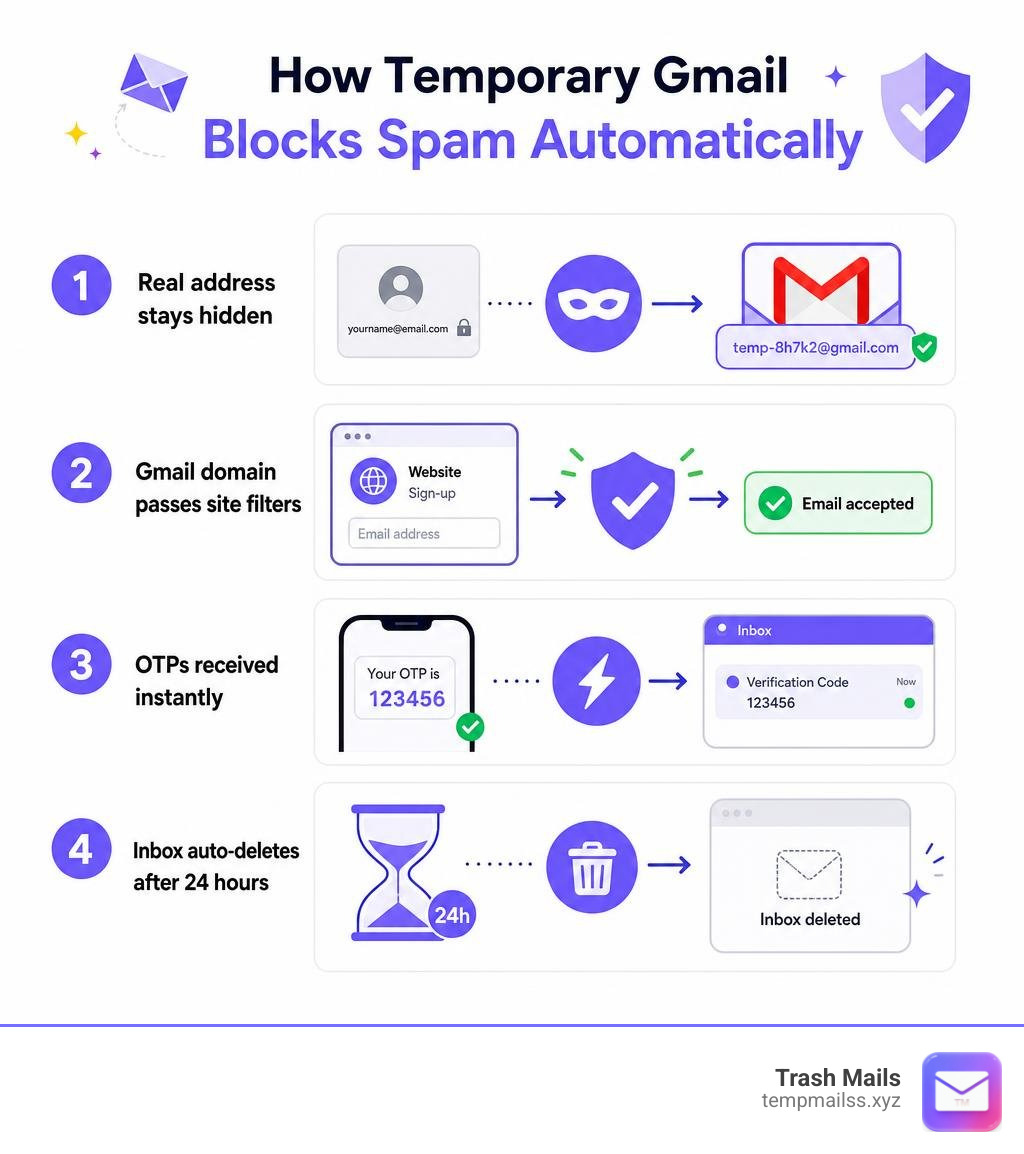
A disposable or temporary Gmail address is a fully functioning email inbox that utilizes Google's official @gmail.com domain structure but is managed by an external system. Unlike a standard Google account, which requires you to provide a phone number, create a password, and agree to extensive tracking, these disposable accounts are generated instantly without any registration.

Behind the scenes, we manage a highly active, secure pool of real Google-hosted mailboxes. When you request an address, our system assigns you a unique variation or a direct alias of one of these active accounts.
Because we use Google’s actual mail exchange infrastructure, the delivery speed is virtually instant. These accounts operate on a receive-only design to prevent spam abuse, meaning you can easily monitor incoming messages in real-time.
Industry data shows that over 219M+ inboxes have been created and 1.34B+ emails received through temporary email services globally. With a reported 99.9% uptime, these tools are built to handle high-velocity registrations, OTP verifications, and trial extensions without breaking a sweat.
How Gmail-Based Inboxes Differ from Generic Temp Mail
The primary difference lies in the domain trust. Traditional temporary email services generate addresses using random, custom domains (e.g., @tempmailss.net or @trashcanmail.biz). Because these domains are public and cheap to buy, databases of blacklisted disposable domains flag them instantly.
A temporary Gmail address, however, routes through Google-backed servers. It carries the exact same domain reputation as an address belonging to a real person. This ensures a near-100% verification success rate and significantly faster delivery speeds.
Key Use Cases for Disposable Inboxes
- App and Website Testing: Developers and QA teams can test registration and notification flows rapidly without setting up complex local mail servers.
- Free Trials and SaaS Products: Sign up for 14-day trials without receiving constant billing reminders, marketing follow-ups, or promotional push notifications.
- Public Wi-Fi Portals: Access internet at airports, hotels, or cafes without giving away your permanent digital identity.
- Online Shopping: Secure one-time coupon codes or download free eBooks without ending up on retail distribution lists.
- Spam Avoidance on Forums: Register on obscure, untrusted, or sketchy sites to read a single thread or download a specific file safely.
Why Websites Block Disposable Emails (But Accept Gmail)
Websites employ sophisticated fraud detection systems that analyze the MX (Mail Exchange) records of incoming sign-ups. If an email address belongs to a domain known for hosting temporary inboxes, the system triggers an automatic block.

These platforms block disposable emails to prevent automated bot registrations, duplicate free trials, and fake accounts. However, they cannot block the @gmail.com domain. Doing so would lock out billions of legitimate, high-value users, severely hurting their user acquisition metrics.
| Feature | Generic Temp Mail | Gmail-Based Temp Mail |
|---|---|---|
| Domain Name | Random / Unknown | @gmail.com / Google |
| Acceptance Rate | Low (often blocked by major sites) | Extremely High (99.9%) |
| Delivery Speed | Variable (can be delayed) | Real-time (under 30 seconds) |
| Security | Minimal (publicly visible inboxes) | High (sandboxed, secure inboxes) |
| Infrastructure | Private virtual servers | Google Mail Servers |
10 Best Temporary Gmail Alternatives for Privacy in 2026
If you want to protect your digital identity, you have several options. In 2026, the landscape of temporary email has evolved to include advanced methods of bypassing filters while maintaining peak security.
1. Dedicated Gmail-Based Generators
For the absolute highest acceptance rate, nothing beats a dedicated generator that provides real @gmail.com addresses. These platforms manage a rolling pool of healthy Google accounts, allowing you to bypass strict verification systems on sites like Facebook, Discord, and Telegram.
Our platform, Trash Mails, is the premier choice in this category. We offer instant, unlimited, and completely free temporary Gmail generation without requiring any registration or personal data.
Our service is tailored for OTP delivery and features a zero-friction interface. Simply visit our site, copy your generated address, and watch your verification codes land in real-time.
2. Gmail Dot Syntax (Dot Variants)
Did you know that Google completely ignores periods in Gmail addresses? According to the official Google Support page, if your real address is johndoe@gmail.com, Google will route any email sent to john.doe@gmail.com or j.o.h.n.d.o.e@gmail.com straight to your primary inbox.
This "dot concept" is an excellent manual alternative to temporary services. You can use different dot variations for different website sign-ups.
If you start receiving spam on john.d.o.e@gmail.com, you can set up a simple inbox filter in your real Gmail settings to automatically archive or delete any messages sent to that specific dot variant.
3. Gmail Plus Addressing (Plus Aliases)
Similar to the dot syntax, Gmail supports "plus addressing." By adding a plus sign (+) and any word after your username, you can create infinite custom aliases on the fly.
For example, signing up for a newsletter with johndoe+newsletter@gmail.com will still deliver those emails to johndoe@gmail.com. This allows you to track exactly which websites are selling your data.
While highly convenient for sorting and tracking, the limitation is that your real username (johndoe) is still visible, meaning it does not offer full anonymity.
4. Generic Disposable Email Services
If you are signing up for a low-risk forum or a quick download where strict domain checks aren't active, standard disposable email providers are a fantastic, lightweight option.
These services generate clean, throwaway mailboxes in a single click with zero tracking. They are perfect for quick, hassle-free tasks where you just need a fast inbox to receive a confirmation link without exposing your real identity.
5. Domain-Rotated Temp Mail
To combat the aggressive blacklisting of disposable domains, some premium temp mail platforms constantly buy and rotate new domains. This keeps them one step ahead of website filters.
These services are highly reliable for bypassing standard filters by routing messages through freshly registered domains. Mobile applications in this category boast strong user ratings, highlighting their popularity and ease of use for users who need to stay ahead of automated domain blocks.
6. Browser Extension Burner Emails
For power users who browse the web constantly, installing a dedicated browser extension is the most efficient route. These extensions place a small icon directly in your browser's toolbar or right-click context menu.
When a site asks for your email, you simply click the icon to auto-generate and fill in a burner address without leaving the page.
These extensions are highly rated by privacy advocates, earning an impressive 4.6 out of 5 rating from 513 user reviews in major extension stores.
7. Custom Domain Temporary Inboxes
If you want your temporary email to look incredibly professional—perhaps for business testing, B2B SaaS trials, or corporate outreach checks—you can use custom domain temporary services.
These tools allow you to connect a domain you own to a temporary email dashboard. You get the benefit of disposable, self-cleaning inboxes, but the addresses look like legitimate corporate emails (e.g., test@yourcompany.com) rather than public burner accounts.
8. Temporary Inboxes from Other Major Platforms
Google isn't the only tech giant with highly trusted domains. Some advanced temporary email services manage pools of real Microsoft Outlook or Hotmail addresses.
These function identically to temporary Gmail services, leveraging Microsoft’s massive domain authority to bypass strict filters during corporate software testing, QA workflows, or platform registrations.
9. Temporary Educational (.edu) Emails
Many software companies and retail services offer massive student discounts or premium access to users with an educational email address.
Some specialized temporary services offer disposable .edu inboxes. These are designed strictly for academic testing or accessing student-specific promotions without exposing a permanent student identity.
10. Local Developer Sandbox Email Tools
If you are a software developer or QA engineer, you don't always need to test your sign-up forms on the live internet. Local sandbox tools (like Mailhog or local SMTP catch-alls) run directly on your machine.
They capture all outbound emails generated by your application, allowing you to inspect HTML layouts, test password reset flows, and verify OTP delivery in a 100% secure, offline environment.
Frequently Asked Questions About Temporary Gmail
How long does a temporary Gmail address stay active?
On most free platforms, a temporary Gmail address remains active for 24 hours. After this retention period, all stored messages are automatically and permanently deleted from our servers to protect your privacy.
If you keep your browser session open, some services allow you to extend this window, but once closed, the data is wiped to maintain a clean security footprint.
Can I send emails using a temporary Gmail service?
No. Temporary Gmail services are strictly receive-only.
Blocking outbound emails is a crucial security safeguard that prevents our servers from being abused by bad actors for phishing campaigns, spamming, or malicious payloads. This restriction is what allows us to keep our domain reputation clean and trusted.
Is it safe to use disposable email addresses?
Yes, it is highly secure for low-risk registrations, free trials, and verification bypasses. It isolates your real identity, protects you from data breaches, and stops tracking cookies associated with your primary email.
However, because these inboxes are temporary, you should never use them for sensitive accounts like personal banking, cryptocurrency wallets, healthcare portals, or government services where you might need long-term password recovery.
Conclusion
Your real email address is a permanent, direct link to your personal identity. Protecting it shouldn't feel like a chore. By utilizing a temporary Gmail address, you can navigate the modern web freely—bypassing annoying paywalls, securing instant OTP verifications, and enjoying free trials without a single piece of spam ever reaching your real inbox.
Ready to take back control of your digital privacy? Start using Trash Mails today and experience the ultimate, spam-free way to explore the internet.










